ASP.NET Core output caching with Redis stores the finished HTTP response in Redis through IOutputCacheStore, so a second instance can serve the same GET without running the action. The default store is in-memory and dies with the process. Redis is the shared store. It is not a backplane bolted onto IDistributedCache.
Instance A  --miss--> run action --> store response in Redis
Instance B  --hit--> Redis --> same body, action skipped
Write path  --EvictByTagAsync("catalog")--> Redis drops tagged entries
Metaphor: the single-server output cache is a tray in one kitchen. Redis is a pass-through both kitchens share. If you put a plate with a guest's name on the shared shelf and do not label it, the other kitchen serves it to the wrong table. The shelf did not create that bug. Sharing it makes the bug visible on every instance instead of only one.
New to this stay here if you already know you need a shared response cache. Which responses deserve output caching at all see output caching vs IMemoryCache. Caching objects, not responses see IMemoryCache and Redis and Redis caching. When Redis is down see Redis connection errors.
People say "backplane" because they remember SignalR. The output-cache feature is a store, not a pub/sub bus. There is no separate invalidation message you must implement if you use tag eviction on that store.
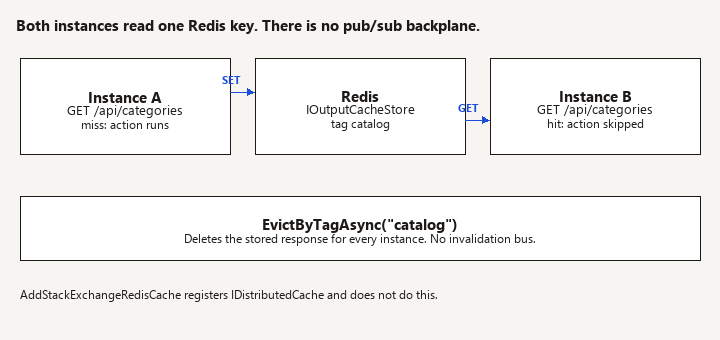
Register Redis as the output-cache store, not a backplane
Watch: Registering IDistributedCache does not switch output caching. Confirm the output-cache store in DI is the Redis one.
Use the package that matches your shared-framework major version (for example the 9.x package on .NET 9, the 10.x package on .NET 10).
dotnet add package Microsoft.AspNetCore.OutputCaching.StackExchangeRedis
var builder = WebApplication.CreateBuilder(args);

builder.Services.AddStackExchangeRedisOutputCache(options =>
{
    options.Configuration = builder.Configuration.GetConnectionString("Redis");
    options.InstanceName = "clinic-output:";
});

builder.Services.AddOutputCache(options =>
{
    options.AddBasePolicy(policy => policy.Expire(TimeSpan.FromSeconds(30)));
    options.AddPolicy("catalog", policy => policy
        .Expire(TimeSpan.FromMinutes(2))
        .Tag("catalog")
        .SetVaryByQuery("page", "pageSize"));
});

var app = builder.Build();

app.UseOutputCache();
app.MapGet("/api/categories", async (CatalogDb db, CancellationToken ct) =>
        await db.Categories.AsNoTracking().OrderBy(c => c.Name).ToListAsync(ct))
    .CacheOutput("catalog");

app.Run();
AddStackExchangeRedisOutputCache replaces the memory IOutputCacheStore. AddStackExchangeRedisCache registers IDistributedCache and does nothing for output caching. Teams add the distributed-cache package, see a Redis connection, and still have per-instance output cache. If you need both object cache and output cache, register both, with different InstanceName prefixes so the keys do not collide.
InstanceName is a key prefix. Use it when one Redis server hosts more than one app. Do not point staging and production at the same prefix.
The connection string is a normal StackExchange.Redis string. For Azure Cache for Redis that includes the host, port 6380, password, and ssl=True. Keep the password in Key Vault or in an access-key setting you do not commit. Managed identity for Azure Redis is available on some SKUs; use it when your standard already does. This page does not re-teach access keys.
UseOutputCache sits after routing decisions you care about and before the endpoint runs, in the same place the single-server post describes. Redis does not change middleware order. Auth still runs. A policy that caches a response must not run before authentication if the decision to cache depends on the user. The safe default is: do not cache authenticated responses.
What is safe to share across instances
Watch: Do not CacheOutput a per-user GET. The bug is the shared body, not the speed. Vary only on inputs that change the bytes.
The base policy caches successful GET and HEAD responses. It does not cache a response that sets cookies. Requests that carry Authorization are not cached by the default policy, which is the correct default: the first caller's JSON must not become everyone else's.
A public catalog GET with a bearer token on every Angular call will not hit this cache until you write a policy that ignores that header. Do not do that for a body that includes the caller's name, flags, or prices. If the JSON is truly identical for every caller, prefer to stop sending Authorization on that one request (a separate public route) rather than teaching the cache to ignore the header. Ignoring Authorization and then accidentally including a user-specific field is a cross-user data bug at CDN speed, except the CDN is your API.
Vary on purpose:
SetVaryByQuery("page", "pageSize")so page 2 is not page 1.SetVaryByHeader("Accept-Language")when the body is translated.- Do not vary by
User-Agentunless you enjoy a cache that never hits. - Do not vary by the raw
Authorizationheader. You would fragment the cache and you might store tokens in the vary key's orbit. The single-server post already says this. It is more dangerous with Redis because the key material leaves the machine. Log keys at debug only, and do not include secrets in vary values.
Set-Cookie on a cached response would stamp one user's cookie onto the next. The middleware refuses that class of response. Do not work around it.
Invalidation by tag
Watch: Tag eviction is best-effort when Redis is down, so the TTL still has to be short enough. Do not point the development store at production Redis.
A two-minute TTL is not enough when someone renames a category and support is on the phone. Tag the policy (catalog) and evict from the write path:
app.MapPost("/api/categories", async (
    CategoryInput input,
    CatalogDb db,
    IOutputCacheStore cache,
    CancellationToken ct) =>
{
    db.Categories.Add(new Category { Name = input.Name });
    await db.SaveChangesAsync(ct);
    await cache.EvictByTagAsync("catalog", ct);
    return Results.Created("/api/categories", input);
}).RequireAuthorization();
Evict after the commit. Evicting before, then failing the save, drops a good cache and the next read repopulates the old row anyway, so you survived, but the reverse (save succeeds, evict throws) leaves stale data until TTL. If evict throws, log it and accept TTL as the backstop, or retry the evict. Do not roll back the business write because Redis hiccuped, unless your product requirement says a stale catalog is worse than a failed save. For a catalog, a stale minute is usually the better failure.
Tags are why the store is not IDistributedCache. Tag deletion has to find every key in the group. The Redis output-cache implementation does that. A hand-rolled IDistributedCache entry per URL will not, unless you maintain the index yourself. Do not start that index.
Failure behavior
If Redis is unreachable, the store throws while getting or setting the entry. The request fails. Output caching with this package is not a silent fallback to the action. Treat Redis as a dependency of every route you mark CacheOutput.
That is the opposite of what some teams expect from the word "cache". Options:
- Keep output caching on the memory store until you have Redis monitoring and a cache you can lose only as a performance path. Memory does not survive a second instance, which is why you are here.
- Wrap
IOutputCacheStorein a decorator that catches connection exceptions, logs them, and returns a miss (and skips the set). Do this only if you accept a stampede when Redis is down: every instance will run the action. A stampede into a weak database is sometimes worse than a 500 from Redis. Choose with the database owner. - Alert on the same connection failures as the rest of your Redis use. The connection error guide applies to this client too: abort connect, TLS, and firewall rules do not change because the caller is output caching.
Do not point output caching at a Redis instance that evicts keys aggressively (maxmemory-policy volatile or all-keys) and also holds your locks or sessions. A cache miss is fine. An eviction of a session is not. Separate databases or separate servers if the policies differ. InstanceName does not isolate memory pressure.
Local versus shared, on purpose
Development can keep the memory store so laptops do not require Redis:
if (builder.Environment.IsDevelopment() &&
    string.IsNullOrEmpty(builder.Configuration.GetConnectionString("Redis")))
{
    builder.Services.AddOutputCache();
}
else
{
    builder.Services.AddStackExchangeRedisOutputCache(o =>
    {
        o.Configuration = builder.Configuration.GetConnectionString("Redis");
        o.InstanceName = "clinic-output:";
    });
    builder.Services.AddOutputCache();
}
Integration tests that assert "the second call skipped the database" need a real store or the memory store in one WebApplicationFactory. Testcontainers Redis is appropriate when you are testing eviction across two hosts. The Testcontainers post shows SQL and Redis hosts. One factory with two clients is not two servers. To prove the shared store, two processes or two factories must share one Redis. If that test is too heavy, a single-process test that the policy varies by page is still worth having, plus one test that EvictByTagAsync changes the next body.
Pitfalls
- Registering
IDistributedCacheand assuming output cache followed it. Check which type is in DI. It should be the Redis output-cache store. - Caching a per-user GET because "Redis is faster". Speed is not the bug. The bug is the body. Read the output-cache versus memory post before you add
CacheOutputto a new route. - Different TTLs for the same tag and a mental model that eviction is the only way data changes. Eviction is best-effort if Redis fails. TTL must be short enough to survive a missed evict.
- Huge responses. Output caching a 20 MB export in Redis pins memory and still makes the first caller wait. Stream exports, do not cache them.
- Vary-by everything. The hit rate collapses and Redis fills with singletons. Vary only on inputs that change the bytes.
- Forgetting
InstanceNamewhen two apps share a server. One app'sEvictByTagAsync("catalog")is bad enough; overlapping key shapes are worse. - Turning on the Redis store in Development against production Redis. You will evict production tags from a laptop. Use a local Redis or the memory branch above.
Verification
- Two API instances, one Redis, one public GET marked with the policy. Restart instance A. The first request after a prime from instance B is a hit: the action's log line does not run on A. Easiest prime is a log inside the endpoint. If both instances log on every request, you are still on the memory store or the policy refused the call (authorization header, cookie, non-200).
- Call
?page=1and?page=2. Both miss once, then hit. The bodies differ. - POST a new category. The next GET does not contain the pre-POST body. If it does, the tag on the policy and the tag you evicted are not the same string.
- Stop Redis. The cached route fails in the way you chose (exception or your decorator's miss). The uncached POST still writes SQL. You did not make the write path depend on the cache by accident.
- A GET with
Authorizationand the default policy does not store a per-user body. Confirm with a second user: they are not served the first JSON. If you customized the policy to allow that header, this test is mandatory, not optional. - Response headers do not include
Set-Cookieon the cached route.
Load: a short burst against one URL should show the action count far below the request count. You do not need a benchmark lab. A log counter is enough to prove the store is shared.
What this page does not cover
Choosing output cache versus IMemoryCache, and the rules for authenticated responses, are the output-caching post. Storing entities and using IDistributedCache directly are the Redis caching posts. SignalR's Redis backplane is a different feature that happens to use the same server. Do not configure one and expect the other to move.
Related: Output caching vs IMemoryCache | IMemoryCache and Redis | Redis caching | Redis connection errors