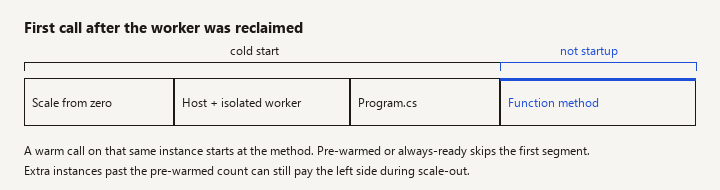
A .NET Azure Functions cold start is the delay while Azure allocates an instance, starts the Functions host, and starts the .NET isolated worker, before your function method runs. The next call on that same instance is a warm start and should not pay that cost again until the instance is reclaimed.
New to this -> use this page to separate startup time from function time and to pick a hosting lever. Related -> .NET 10 API highlights will not change the Consumption scale-to-zero behavior by themselves. Not this page -> how to write your first isolated function, durable functions, or a full AKS migration.
Prove the delay is startup
The symptom is "sometimes the HTTP function takes seconds, then it is fine." The useful answer is a short diagnostic, then the few changes that move the number, then the changes that feel productive and do not. This is that filter for the isolated worker, which is the .NET path to optimize. Do not spend the effort on the in-process model.
When this applies
You are in this problem when:
- The app uses the Consumption plan, or Flex Consumption, or Premium, and some requests arrive when no instance is already running your worker.
- The slow calls correlate with the first call after idle, a deploy, a scale-out, or a new instance -- not with a particular input.
- Logs show a long gap before your function's first line, or the platform metrics show a cold start rather than a long function duration.
You are not in this problem when every call is slow, including the tenth call on a warm instance. That is your code, your dependency, or your plan's CPU. Fix the warm path first or you will "solve" cold start and still be slow.
HTTP-triggered user-facing APIs feel cold starts. A timer that runs every minute often stays warm by accident. A queue trigger can hide the delay inside lag. Know which trigger you are judging.
Confirm it is a cold start
Watch: A profiler attached to an already warm instance never shows this delay. Compare the first call after idle with the second, and do not treat function duration as host startup.
Do this before you change plans.
- Call the function twice, back to back, on the same instance if you can pin traffic (a single instance, or look at the instance id in logs). If the first call is slow and the second is fast, startup is involved.
- In Application Insights or the Functions metrics, look at cold-start related platform signals your hosting plan exposes, and at the function duration. Cold start sits outside the duration of your method. If "duration" is already several seconds, the method itself is slow.
- Read the host logs around the slow call. Isolated .NET logs a worker start. A failure to start (bad
Program.cs, missing setting, exception in a singleton constructor) looks like a cold start but repeats on every instance. Fix startup exceptions before you buy a bigger plan. - Note the plan. Consumption and Flex Consumption are allowed to reach zero workers. Premium can keep pre-warmed workers. An App Service plan / dedicated plan does not scale to zero the same way; you still pay for restart on deploy and recycle, which is a shorter list of causes.
Write down the number you are chasing (for example "first call after 20 minutes idle"). Without a number, every tweak looks like a win.
What actually helps
Watch: Pre-warmed or always-ready instances are the lever for user-facing HTTP. A timer ping on Consumption is temporary, and extra instances on scale-out can still be cold.
Stop scaling to zero for user-facing HTTP. The largest lever is the hosting model, not a NuGet package.
- Premium plan with pre-warmed instances (
preWarmedInstanceCount/ the portal's pre-warmed instance setting) keeps one or more workers started. You pay for them even when idle. That is the point. Elastic scale-out can still cold-start additional instances beyond the pre-warmed set; pre-warm covers the idle case, not an unbounded spike. - Flex Consumption offers always-ready instances for the same idea: a configured number of instances that are not scaled to zero. Use them for the functions that have a user waiting. Leaving always-ready at zero preserves the cold start.
- Dedicated plan (App Service plan) if the function app is really a small always-on API. You lose some of the scale-to-zero billing. You also lose the cold start that comes from zero. Do this when the traffic is steady and the team is tired of pretending a latency-sensitive API is an occasional job.
There is no universal millisecond budget here. Measure in your region, with your dependencies. Anyone who quotes a single cold-start time for "Azure Functions .NET" without the plan and the app is guessing.
Cut work in Program.cs. On the isolated worker, the process starts, then your host builder runs before the first invocation is healthy. Every synchronous call you put there is on the cold path:
- Building a large DI graph of clients you do not need for this function.
- Reading a secret from Key Vault with a blocking call at startup, especially over a cold VNet path.
- Running EF migrations or a SQL connectivity check that retries for 30 seconds.
- Loading huge static data into memory "so the function is fast later."
Register clients lazily or on first use when only one function in the app needs them. A Function app that hosts twenty unrelated functions pays the union of startup work on every new instance. Split apps that do not share a scaling story. An HTTP API and a nightly file import do not belong in one process if the import drags half of a PDF stack into startup.
var host = new HostBuilder()
    .ConfigureFunctionsWorkerDefaults()
    .ConfigureServices((context, services) =>
    {
        // Register types. Do not call the network here.
        services.AddHttpClient("downstream", client =>
        {
            client.BaseAddress = new Uri(context.Configuration["Downstream:BaseUrl"]!);
            client.Timeout = TimeSpan.FromSeconds(10);
        });
        services.AddSingleton<IInvoiceClient, InvoiceClient>();
    })
    .Build();

await host.RunAsync();
The HTTP client is created when first resolved, not while the host is still starting, as long as you do not resolve it inside ConfigureServices. Keep it that way. A "warm-up" loop at the bottom of Program.cs that hits SQL makes every cold start longer in exchange for a warmer second call you were going to get anyway.
Shrink what has to load. Fewer assemblies and a smaller deployment package mean less to copy and JIT. Remove unused binding extensions. Prefer the isolated worker's current target framework your plan supports (.NET 8 LTS or the later supported LTS you have actually tested), because that is what the platform maintains workers for. ReadyToRun can reduce JIT on startup for some apps and increase package size for others. Treat it as a measured experiment, not a default slogan. Native AOT for Functions is a separate, narrower path: only adopt it when the current Functions documentation says your trigger, bindings, and libraries are supported. Do not promise AOT cold-start wins for an app full of reflection-based bindings.
Network path. A cold start plus a private endpoint or VNet integration that must be set up for a new instance adds time that no amount of C# cleanup removes. If the first SQL call on a new instance is most of the delay, measure DNS, private link, and connection pool separately from the worker start. Reusing a static HttpClient or SqlConnection pool helps the warm path. It does not skip the platform's instance allocation.
Dependencies that retry. Polly or AddStandardResilienceHandler with a long first-try timeout, placed around a client that is constructed at startup, turns a 1-second failure into a 20-second cold start. Retry inside the function for a warm call if you must. Do not retry a doomed secret fetch five times before the host is ready.
What does not help
Watch: async and a longer function timeout do not shorten instance startup. Key Vault or SQL calls in Program.cs before RunAsync sit on every new worker.
- Sprinkling
asyncon a method that is already a short CPU burst. - Raising the Functions timeout. That lets the cold start finish instead of failing. It does not make it shorter.
- A timer trigger whose only job is to poke the app every five minutes on Consumption. It is a fragile way to buy a warm instance, it costs invocations, and scale-out still cold-starts extra instances. Prefer pre-warmed or always-ready if you need the guarantee. A ping can be a temporary mitigation while you change plans; write down that it is temporary.
- Micro-optimizing LINQ in a method whose profiler says 40 ms, while startup is 3 seconds.
- Adding Application Insights custom events. They help you see the cold start. They do not remove it.
- Moving the same code to "just use minimal APIs" without a plan. The cold start you feel is the scale-to-zero platform plus the .NET process. An always-on App Service plan for an ASP.NET Core app is a valid alternative when you need a normal web API. It is an architecture change, not a one-line fix. Choose it when the function is really an HTTP API with a latency target.
Plan choice in one paragraph
If the function is occasional, asynchronous, and the caller retries (queue, event), Consumption's cold start is often acceptable and cheaper. If a human or a synchronous partner waits on HTTP, buy an always-ready or pre-warmed instance, or stop using scale-to-zero. Premium and Flex always-ready cost money when idle. That cost is the product you are purchasing. Compare it with a dedicated plan before you stack both a pre-warmed Functions app and a second always-on API "just in case."
Pitfalls
- Optimizing a warm trace. The profiler attached to a running instance never shows the cold start. Capture the first request after idle.
- One app, many functions. The heavy function's dependencies slow the light HTTP function because they share a worker process.
- Key Vault and config at startup with no local override. Every new instance waits on the vault. For local and for startup, bind configuration the platform already injected (
IConfiguration) instead of calling the vault client beforeRunAsync. - Assuming in-process guidance still applies. Older posts about
FUNCTIONS_WORKER_RUNTIMEtweaks and in-process script hosts do not map one-to-one onto the isolateddotnet-isolatedworker. Check the hosting model in the portal before you apply a setting from a five-year-old comment. - Region and stamp variance. A number you measured once in one region is not a contract. Re-measure after you change the plan, because the plan change is the experiment.
- Scale-out surprise. Pre-warmed count is not max scale. Instance 11 can still be cold during a spike. If that is unacceptable, cap scale or move to dedicated capacity and test the spike.
- Blaming JIT only. A worker that starts in 400 ms and then spends 5 seconds in your startup SQL check is your code. Split the metric.
Verification
After a change, idle the app long enough that the plan is allowed to reclaim the worker (or scale to a new instance on purpose). Then:
- Record time to first byte on the first HTTP call and on the second.
- Confirm logs show a worker start on the first and not on the second.
- Confirm function duration on the first call, excluding host startup, did not get worse.
- If you enabled pre-warmed or always-ready instances, confirm the platform setting in the deployed app, not only in a bicep file you have not applied. Send the idle call and expect no scale-from-zero delay for that instance count.
- Watch one scale-out event. Extra instances may still be cold. Decide if that meets the target before you close the bug.
If the first and second calls are equally slow, return to the warm-path dependency. You are finished with cold-start work.
Boundaries
This page will not walk through creating a function, choosing isolated versus the retired in-process model in full, or deploying with GitHub Actions. Those are prerequisites. The decision you came for is narrower: prove the delay is instance startup, remove startup work you added, and pay for a warm worker if a person is waiting on HTTP.