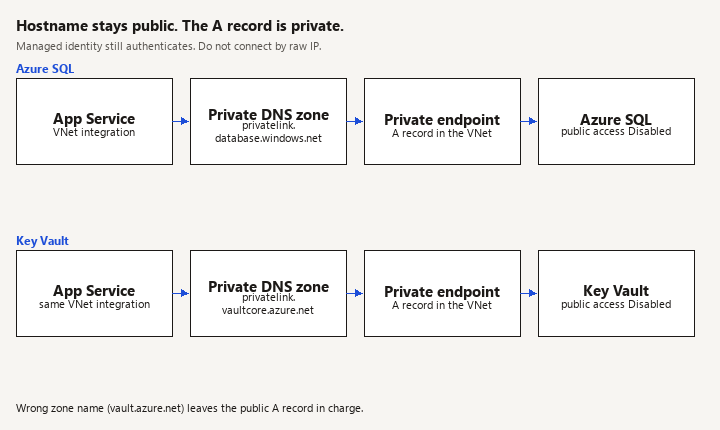
Azure private endpoints for an ASP.NET Core app put a network interface in your virtual network for Azure SQL and for Key Vault, and turn off the public door once the app resolves those services to the private IPs. The app still uses the ordinary hostnames. It does not connect by raw IP, and it does not stop using managed identity.
App Service (regional VNet integration, subnet A)
    |  DNS: server.database.windows.net -> 10.x private IP
    |  DNS: vault.vault.azure.net        -> 10.x private IP
    v
subnet B
    private endpoint SQL
    private endpoint Key Vault
    public access on both: Disabled (last step)
Metaphor: a private endpoint is a staff door on the inside of the building. The sign on the door still says the public name (database.windows.net). If the receptionist (DNS) keeps sending people to the street address, they bounce off a locked public door and you blame the application.
New to this stay here. How the app authenticates see managed identity. How configuration reads the vault see Key Vault secrets. How the app is hosted see App Service. A wrong Redis hostname fails in a similar "it works from my laptop" way: Redis connection errors.
This page does not show how to call SecretClient.
How ASP.NET Core reaches SQL and Key Vault on private endpoints
Inbound users can still hit the App Service URL in public, unless you also lock the app down. This page is outbound from the app to SQL and Key Vault. Mixing up the two produces a design that hides the API and leaves SQL public, or the reverse.
You need:
- A virtual network.
- Subnet A, delegated to
Microsoft.Web/serverFarms, used only for App Service regional VNet integration. Keep it small but not tiny; integration consumes addresses. - Subnet B for private endpoints. Disable private endpoint network policies on that subnet if the portal or deployment still requires it for your region (the control has moved over time; follow the current portal warning rather than a 2021 screenshot).
- Regional VNet integration on the App Service, on subnet A. That feature needs a plan SKU that supports it (Standard and above in current App Service docs; production APIs are usually Premium v3). A Free or Shared plan will not do this. Confirm the SKU in the portal before you write Bicep, so you do not debug a delegation error that is really a SKU error.
- A private endpoint on the SQL server (subresource
sqlServer) and one on the vault (subresourcevault). - Private DNS zones
privatelink.database.windows.netandprivatelink.vaultcore.azure.net, linked to the same virtual network, with the A records the private endpoint created (use a DNS zone group so the records are not hand-typed).
The connection string host stays your-server.database.windows.net. The vault URI stays https://your-vault.vault.azure.net/. Private DNS overlays those names inside the VNet. Code that special-cases a private IP will break the day the endpoint is rebuilt and the IP changes.
Route the private addresses
Watch: Route-all does not fix DNS. Run nameresolver from the app, not from a laptop, and confirm the private IP before you disable public access.
Regional VNet integration sends RFC1918 traffic into the virtual network. Private endpoint addresses live in your VNet or in a peered VNet, so they are in that class. If SQL's private endpoint is in a peered network, or you also need the app's other outbound calls to leave through a firewall in the VNet, enable route-all:
az webapp config set \
  --resource-group rg-clinic-api \
  --name clinic-api \
  --vnet-route-all-enabled true
Route-all does not fix DNS. DNS and routing are separate failures. A private IP that is never resolved is a public connection that the firewall rejects. A private IP that is resolved but not routed dies as a timeout. When you write the incident note, say which one you observed.
App Service must use DNS that can see the private zones. With the zones linked to the integrated VNet, resolution from the app should return the private address. From Kudu / the Advanced Tools console:
nameresolver your-server.database.windows.net
nameresolver your-vault.vault.azure.net
You want the 10.x address, not a public Azure address. nslookup on your laptop is the wrong test. Your laptop is not in the VNet, unless you are on VPN, in which case you are testing the VPN, not the app.
Identity still does the login
Watch: A private endpoint does not replace managed identity. Dial the SQL hostname, not the NIC address, or TLS fails and TrustServerCertificate hides it.
Private network plus a SQL admin password in an app setting is a common half-measure. Use managed identity for both services. The identity post shows DefaultAzureCredential and the SQL user you create for the app's client id. The Key Vault post shows the configuration provider and the access policy or RBAC role (Key Vault Secrets User).
This page adds only the network constraints:
- SQL firewall "Allow Azure services" is not a private endpoint. Turn that habit off. It trusts a very large set of Azure compute.
- Key Vault network rules should end as Disable public access, not as "selected networks" plus your home IP, if the requirement is private-only. Your home IP is for a break-glass operator through a bastion or VPN, documented separately.
Encrypt=Truestays on the SQL connection string. Private does not mean unencrypted. Do not setTrustServerCertificate=trueto silence a name mismatch. If TLS fails, the name the client dialed does not match the certificate, which usually means you connected by IP. Dial the hostname.
A minimal data-plane check inside the app, after configuration is loaded:
app.MapGet("/health/deps", async (IConfiguration config, CancellationToken ct) =>
{
    var cs = config.GetConnectionString("Sql");
    await using var conn = new SqlConnection(cs);
    await conn.OpenAsync(ct);
    var vault = config["KeyVault:VaultUri"];
    return Results.Ok(new { sql = "open", vaultHost = new Uri(vault!).Host });
}).RequireAuthorization("HealthProbe");
Do not leave this route anonymous, and do not return the connection string. A production health check should use the existing health-check endpoints and a low-privilege SQL ping, not a new public diagnostic that prints infrastructure. The sample is a temporary staging probe.
Order of operations
Watch: Disabling public access before the private DNS zone is linked locks the app out. A 403 after the change is usually RBAC; a timeout is DNS or routing.
Do this in an environment you can break:
- Integration and private endpoints in place, public access still on.
nameresolvershows private IPs from the app.- The app opens SQL and reads one secret from the vault while public access is still on. You are proving the private path is the one taken, which is why the resolver result matters. A successful query alone does not prove the path if public access is open.
- Disable public network access on SQL. Repeat the query from the app. It must work. From a laptop that is not on the network, it must fail.
- Disable public access on the vault. Repeat a secret read from the app. A laptop
curlto the vault URI must fail.
If you swap step 4 with step 2, you lock the app out and you lock your own emergency SQL window. Keep a break-glass path (a private VM or a temporary public rule with a timer) until step 4 has succeeded once.
Local development does not join this VNet by magic. Developers keep a dev SQL that is firewalled to their IP, or they use VPN. Do not point appsettings.Development.json at the private production server and then disable public access. The App Service post is the place for slots and app settings; use a staging slot on the same integration subnet so the slot is subject to the same DNS. Slots do not inherit a mental model. Check the slot's VNet integration explicitly.
Pitfalls
- Public access disabled before DNS is linked. The app and every pipeline migration fail together. The error looks like a password problem or a timeout, depending on whether traffic hit the public firewall or a black hole.
- Typo in the zone name (
vault.azure.netinstead ofprivatelink.vaultcore.azure.net). Records exist. Nothing queries them. - Private endpoint in a different region than the app "for cost". Latency and peering become the product. Keep them aligned unless you have a reason you can explain.
- Testing only from the portal's query editor, which uses a different network path than the Web App.
- Managed identity assigned on the production slot only. The staging slot has integration and no identity, so Key Vault 403s and someone re-opens public access to "fix" it.
- Service endpoints confused with private endpoints. A service endpoint changes the outbound path from the subnet and still uses the public service address. A private endpoint gives the service a private NIC. This design uses private endpoints. Do not enable both and hope the docs average out.
- Application code caching the first DNS result forever in a custom
HttpClienthandler that resolves once at startup. Prefer the normal SQL client andSecretClient, which use the system resolver.
Verification
From the App Service console, not from a laptop:
nameresolveron the SQL host and the vault host prints private addresses in subnet B's range.- App logs show SQL open and a secret read (the secret name, not the value).
- With public access disabled, the same checks still pass.
- A machine off the VNet cannot open port 1433 on the public SQL name and cannot get a secret. The failure is a network or firewall denial, not a 200.
- Restart the app. Resolution still returns private addresses. You did not depend on a warm DNS cache from a single lucky request.
- Staging slot, if you use one, passes steps 1 through 3 on its own identity.
Alert on SQL connection failures and Key Vault 403s separately. A 403 after this change is usually RBAC. A timeout is usually DNS or routing. Treating both as "the private endpoint is down" wastes the outage.
What this page does not cover
Creating the managed identity, the SQL CREATE USER FROM EXTERNAL PROVIDER statement, and the Key Vault configuration provider are written. Private endpoints for Storage, Redis, or Service Bus use the same pattern with different zone names (privatelink.blob.core.windows.net, privatelink.redis.cache.windows.net, privatelink.servicebus.windows.net). Repeat the checklist; do not copy the SQL zone onto Redis. Inbound private access to the App Service (a private endpoint on the app plus private DNS for privatelink.azurewebsites.net) is a different project: it hides the API. This page assumes the browser still reaches the API and the API no longer reaches data over the public service endpoints.
Related: Managed identity | Key Vault secrets | App Service | Redis connection errors