Background report generation with SignalR in ASP.NET Core means the HTTP request only records the job, a hosted worker produces the file, and the hub pushes progress to subscribers who are allowed to see that job. SignalR is the notifier, not the job store.
New to this - stay here for the composition. Hubs and auth - SignalR patterns. Worker lifetime - BackgroundService. When a channel is not enough - Hangfire vs Quartz vs channels.
How do you show background report progress with SignalR?
Search intent for background report signalr asp.net core is a how-to. The reader has an Angular button, "Export," that currently blocks, times out, or returns a huge file on the same request. They want progress on screen and a download link when the file exists.
This page walks that path. It assumes you already know a hub can be authorized and a BackgroundService must not capture a request-scoped DbContext. It does not re-teach transports, and it does not compare job servers.
When should the export leave the HTTP request?
Use this when the export takes more than a couple of seconds, reads a lot of tenant data, or builds a file you would rather not hold in the HTTP response. Typical cases: clinic invoice PDFs, payroll spreadsheets, audit extracts.
Do not use it for a report the database can stream in under a second. A background job plus a hub is a lot of moving parts for a small CSV.
The in-memory channel below is correct for a single instance and for learning the shape. If a deploy must not drop queued jobs, put the queue in a durable store (database table polled by the worker, or a real broker) and keep the same hub notifications. The channel is the easy part to swap.
Versions: ASP.NET Core on .NET 8 or later, Angular with @microsoft/signalr.
Why is the job a row, not a SignalR message?
Watch: Task.Run inside the request dies on deploy and has no scope. Persist the job. An unbounded channel lets a user mashing Export fill memory.
SignalR does not remember progress. If the user refreshes, the group subscription is gone and so is every percentage you already sent. Persist the job first.
public enum ReportState { Queued, Running, Ready, Failed }

public sealed class ReportJob
{
    public Guid Id { get; set; }
    public Guid TenantId { get; set; }
    public string RequestedByUserId { get; set; } = "";
    public ReportState State { get; set; }
    public int Progress { get; set; }
    public string? Failure { get; set; }
    public string? BlobPath { get; set; }
    public DateTimeOffset CreatedAt { get; set; }
}
TenantId is required even if you also store the user id. Progress notifications that are only keyed by job id will leak across tenants the moment someone guesses a GUID. GUIDs are not authorization.
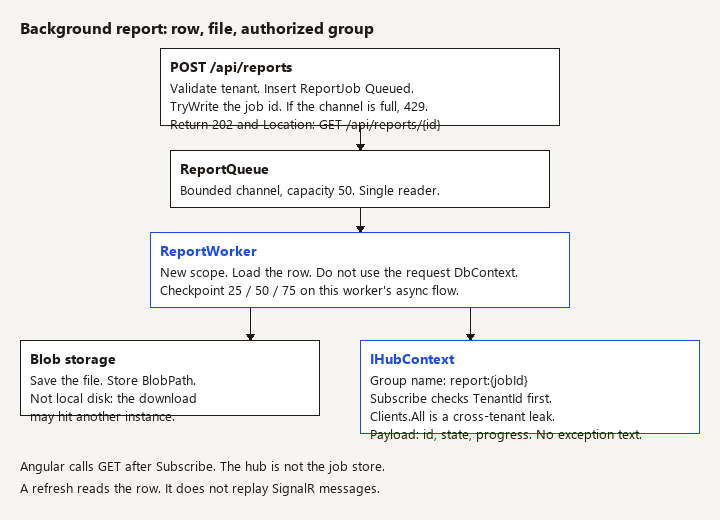
On POST, validate the filter, confirm the caller may export that range, insert Queued, enqueue, return 202 Accepted with a Location of GET /api/reports/{id}. Do not return the file. Do not Task.Run the generator after Ok().
app.MapPost("/api/reports", async (
    ReportRequest request,
    ClinicDbContext db,
    ReportQueue queue,
    HttpContext http,
    CancellationToken ct) =>
{
    var tenantId = Guid.Parse(http.User.FindFirstValue("tenant_id")!);
    var userId = http.User.FindFirstValue("sub")!;

    var job = new ReportJob
    {
        Id = Guid.NewGuid(),
        TenantId = tenantId,
        RequestedByUserId = userId,
        State = ReportState.Queued,
        CreatedAt = DateTimeOffset.UtcNow
    };
    db.ReportJobs.Add(job);
    await db.SaveChangesAsync(ct);
    if (!queue.TryEnqueue(job.Id))
    {
        job.State = ReportState.Failed;
        job.Failure = "Report queue is full. Try again shortly.";
        await db.SaveChangesAsync(ct);
        return Results.StatusCode(StatusCodes.Status429TooManyRequests);
    }

    return Results.Accepted($"/api/reports/{job.Id}", new { job.Id, job.State });
}).RequireAuthorization();
Enqueue the id, not the entity. The worker loads the row inside a new scope. A detached entity captured in the channel becomes a stale, untracked object and a lifetime bug.
GET returns the row for this tenant only. That endpoint is what the UI uses after reconnect. The hub is an optimization.
How does the worker build the file and publish progress?
Watch: Write the file to blob storage, not local disk. The download can land on another instance and 404. Do not SaveChanges on one DbContext from a progress callback.
public sealed class ReportQueue
{
    private readonly Channel<Guid> _channel = Channel.CreateBounded<Guid>(
        new BoundedChannelOptions(50)
        {
            FullMode = BoundedChannelFullMode.Wait,
            SingleReader = true,
            SingleWriter = false
        });

    public ChannelReader<Guid> Reader => _channel.Reader;

    public bool TryEnqueue(Guid jobId) => _channel.Writer.TryWrite(jobId);
}

public sealed class ReportWorker(
    ReportQueue queue,
    IServiceScopeFactory scopes,
    IHubContext<ReportHub> hub,
    ILogger<ReportWorker> logger) : BackgroundService
{
    protected override async Task ExecuteAsync(CancellationToken stoppingToken)
    {
        await foreach (var jobId in queue.Reader.ReadAllAsync(stoppingToken))
        {
            try
            {
                await RunOneAsync(jobId, stoppingToken);
            }
            catch (OperationCanceledException) when (stoppingToken.IsCancellationRequested)
            {
                throw;
            }
            catch (Exception ex)
            {
                logger.LogError(ex, "Report job {JobId} failed", jobId);
            }
        }
    }

    private async Task RunOneAsync(Guid jobId, CancellationToken stoppingToken)
    {
        using var scope = scopes.CreateScope();
        var db = scope.ServiceProvider.GetRequiredService<ClinicDbContext>();
        var files = scope.ServiceProvider.GetRequiredService<IReportFiles>();
        var builder = scope.ServiceProvider.GetRequiredService<IReportBuilder>();

        var job = await db.ReportJobs.SingleOrDefaultAsync(j => j.Id == jobId, stoppingToken);
        if (job is null || job.State is ReportState.Ready or ReportState.Failed)
            return;

        job.State = ReportState.Running;
        await db.SaveChangesAsync(stoppingToken);
        await Publish(job, stoppingToken);

        try
        {
            var lastCheckpoint = 0;
            await using var stream = await builder.BuildAsync(job, async (percent, token) =>
            {
                if (percent < 100 && percent < lastCheckpoint + 25)
                    return;
                lastCheckpoint = percent;
                job.Progress = percent;
                await db.SaveChangesAsync(token);
                await Publish(job, token);
            }, stoppingToken);
            job.BlobPath = await files.SaveAsync(job.TenantId, job.Id, stream, stoppingToken);
            job.Progress = 100;
            job.State = ReportState.Ready;
            job.Failure = null;
        }
        catch (Exception ex) when (!stoppingToken.IsCancellationRequested)
        {
            job.State = ReportState.Failed;
            job.Failure = "The report could not be generated.";
            logger.LogError(ex, "Report build failed for {JobId}", job.Id);
        }

        await db.SaveChangesAsync(stoppingToken);
        await Publish(job, stoppingToken);
    }

    private Task Publish(ReportJob job, CancellationToken ct) =>
        hub.Clients.Group($"report:{job.Id}").SendAsync(
            "reportStatus",
            new { job.Id, job.State, job.Progress },
            ct);
}
Register ReportQueue as a singleton and ReportWorker with AddHostedService. IHubContext is safe to inject into the singleton worker. ClinicDbContext is not, which is why the scope exists.
BuildAsync must invoke the checkpoint delegate in order on this worker's async flow. A Progress<T> callback on another thread will race SaveChanges on the same DbContext. Persist 25, then 50, then 75, and publish those checkpoints. One event per invoice saturates the connection and the database. The builder's contract is Func<int, CancellationToken, Task>, not IProgress<int>.
Never put the exception text in job.Failure or the hub payload. The log has the exception. The client gets a fixed sentence.
How does the hub authorize the group?
Watch: Do not Clients.All the progress. Join the group only after you check this user may see this job.
[Authorize]
public sealed class ReportHub(IServiceScopeFactory scopes) : Hub
{
    public async Task Subscribe(Guid jobId)
    {
        using var scope = scopes.CreateScope();
        var db = scope.ServiceProvider.GetRequiredService<ClinicDbContext>();
        var tenantClaim = Context.User?.FindFirstValue("tenant_id");
        if (!Guid.TryParse(tenantClaim, out var tenantId))
            throw new HubException("Missing tenant.");

        var allowed = await db.ReportJobs.AnyAsync(j =>
            j.Id == jobId && j.TenantId == tenantId);

        if (!allowed)
            throw new HubException("Report not found.");

        await Groups.AddToGroupAsync(Context.ConnectionId, $"report:{jobId}");
    }
}
HubException messages go to the caller. Keep them generic so you do not confirm another tenant's ids. Do not Groups.AddToGroupAsync from the client with a group name the client invented. If the client picks the group, the client picks the victim.
Map the hub next to the API: app.MapHub<ReportHub>("/hubs/reports").
On more than one server, configure Azure SignalR Service or a Redis backplane, or the worker's SendAsync hits a different node than the browser. A single instance can skip the backplane. Production rarely stays single instance.
How does Angular subscribe and still survive a refresh?
export class ReportPage {
  private hub?: signalR.HubConnection;
  readonly status = signal<{ state: string; progress: number } | null>(null);

  async start(request: ReportRequest, api: string, token: () => Promise<string>) {
    const created = await fetch(`${api}/api/reports`, {
      method: "POST",
      headers: {
        "Content-Type": "application/json",
        Authorization: `Bearer ${await token()}`
      },
      body: JSON.stringify(request)
    });
    if (created.status !== 202) throw new Error("Export was not accepted.");
    const { id } = await created.json();

    this.hub = new signalR.HubConnectionBuilder()
      .withUrl(`${api}/hubs/reports`, { accessTokenFactory: token })
      .withAutomaticReconnect()
      .build();

    this.hub.on("reportStatus", (msg) => this.status.set(msg));
    this.hub.onreconnected(async () => {
      await this.hub!.invoke("Subscribe", id);
      await this.refresh(api, id, token);
    });

    await this.hub.start();
    await this.hub.invoke("Subscribe", id);
    await this.refresh(api, id, token);
  }

  private async refresh(api: string, id: string, token: () => Promise<string>) {
    const res = await fetch(`${api}/api/reports/${id}`, {
      headers: { Authorization: `Bearer ${await token()}` }
    });
    if (res.ok) this.status.set(await res.json());
  }
}
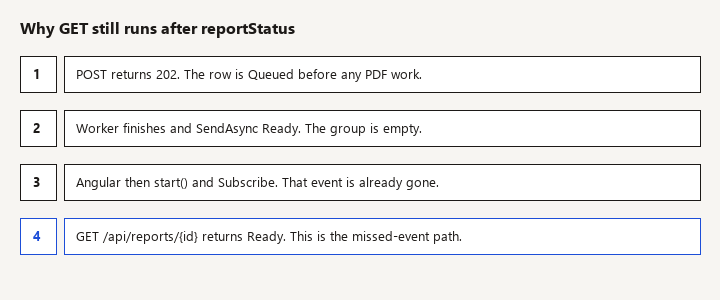
Always refresh after subscribe. Otherwise a job that finished between POST and start stays on screen as "Queued" because you missed the only reportStatus event.
When state is Ready, call a download endpoint that checks tenant again and redirects to a short-lived blob URL. Do not put a permanent storage URL in the hub message.
What fails in review?
Task.Runinside the minimal API so you can return 202 without a worker. The task dies on deploy, has no scope, and has no stopping token.- Sending
Clients.AllorClients.Userwithout checking the job tenant. User ids collide across identity systems; groups must be authorized inSubscribe. - Storing the file on local disk. The next request hits another instance and the download 404s. Use blob storage (or a database only if the file is genuinely small).
- Unbounded
Channel.CreateUnbounded. A user mashing Export fills memory. Bound the channel and return 429 or a problem response when the writer would wait too long. Inbound rate limiting still applies; see rate limiting vs Polly. - Updating
job.Progressfrom aProgress<T>callback and callingSaveChangesconcurrently on oneDbContext. Checkpoint from the worker loop, not from an arbitrary callback thread. - Forgetting host shutdown:
stoppingTokencancels the read loop; in-flight work should stop writing a corrupt blob and leave the rowRunningor reset it toQueuedso a durable queue can retry. An in-memory channel cannot retry what it already dropped.
How do you verify progress and tenant isolation?
POSTreturns 202 and a row inQueuedbefore any PDF library runs.- The UI receives
reportStatuswith increasing progress, thenReady. The download works with the same user and fails with 404 for another tenant. - Refresh the page mid-run.
GETreturns the last checkpoint even if the hub event was missed. After reconnect,Subscribeis called again. - Call
Subscribewith another tenant's job id. The hub rejects and that connection is not in the group (watch server logs, or try to observe silence from a second client). - Stop the process during
BuildAsync. The row is notReadyand no partial file is linked. Restart behavior matches the queue you actually chose: channel loses the job; a table-backed queue picks it up. - Hold the browser on the page and confirm you do not get one SignalR message per source row.
When do you replace the in-memory channel?
When "the export disappeared on deploy" becomes a ticket, replace ReportQueue with a table of Queued jobs or a service bus message, and keep ReportWorker, the row, and the hub. That swap is the point of enqueueing an id. If you need retries, dashboards, and cron as well, compare job servers instead of growing the channel.