AKS workload identity for an ASP.NET Core pod means the pod's Kubernetes service account is trusted by Microsoft Entra through a federated credential, so DefaultAzureCredential or WorkloadIdentityCredential can obtain an Azure access token without a stored client secret.
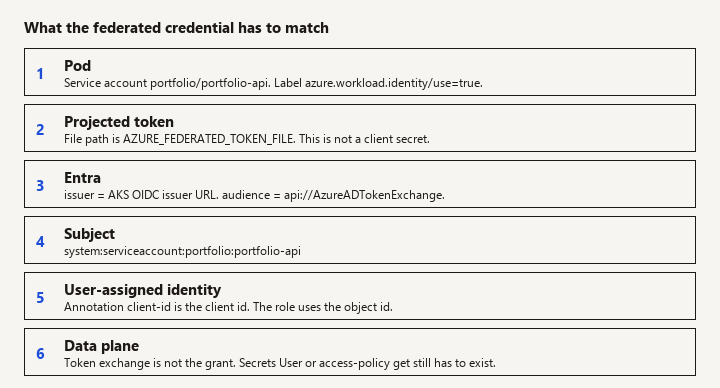
New to this -> follow the sequence from cluster features to the ASP.NET credential. Related -> Key Vault access policies vs RBAC for the grant after the token exists. Not this page -> App Service system-assigned identity, GitHub OIDC for CI, or the Aspire dashboard.
Four objects that have to match
You already deploy to AKS and were told to stop mounting client secrets. You need the four objects that must agree (cluster issuer, managed identity, federated credential, annotated service account) and the .NET configuration that picks that identity up. This is that wiring. It is not a Kubernetes tutorial and not a Key Vault authorization model essay.
When this applies
Use workload identity when:
- The process is a pod on AKS (or another Kubernetes cluster that Microsoft documents for workload identity; this page says AKS).
- The pod calls Azure APIs: Key Vault, Storage, Service Bus, Azure SQL with Entra auth, and similar.
- You can create a user-assigned managed identity and a federated credential.
Do not use it for:
- A laptop. Developers keep using Azure CLI or a separate dev identity against a dev resource. Do not copy the production federated setup into
appsettings.Development.jsonas a secret. - App Service or Azure Functions. Those use the platform's managed identity injection, not a Kubernetes service account. The .NET call often still says
DefaultAzureCredential, but the setup articles are different. - CI pipelines. GitHub Actions or Azure DevOps OIDC is a different federated credential (different issuer and subject). Do not reuse the pod's service-account subject for a pipeline.
The old aad-pod-identity exception list and AzureIdentityBinding CRD are not part of this design. If a cluster still runs that addon, plan its removal rather than stacking it with workload identity on the same pods.
What must already be true on the cluster
Two cluster features:
- OIDC issuer. AKS publishes an issuer URL. The federated credential's issuer must be that URL, exactly, including
https. - Workload identity webhook. It injects
AZURE_CLIENT_ID,AZURE_TENANT_ID, andAZURE_FEDERATED_TOKEN_FILEinto labeled pods and mounts the projected token.
Enable both when you create the cluster or update an existing one (oidc-issuer and enable-workload-identity on the AKS CLI, or the equivalent Bicep). Then read the issuer back:
az aks show --resource-group rg-portfolio --name aks-portfolio --query "oidcIssuerProfile.issuerUrl" -o tsv
If this command prints nothing, stop. A federated credential without the real issuer will produce tokens Kubernetes thinks are fine and Entra will reject.
You do not install a client secret as a cluster secret "while the issuer propagates." Fix the issuer.
The managed identity and the federated credential
Watch: The subject must match the service account exactly, and the issuer is per cluster. A rebuilt cluster needs a new federated credential or Entra rejects the token while the pod still starts.
Create a user-assigned managed identity in Azure. System-assigned identities are tied to an Azure resource's lifecycle; a Kubernetes service account is not an Azure resource, so the identity you federate is user-assigned.
Grant that identity whatever data-plane role it needs, on the narrowest scope. For Key Vault secret reads, that is Key Vault Secrets User on that vault when the vault uses the RBAC permission model. The federation step does not grant this. A token to a vault you cannot read is still a 403. See access policy versus RBAC.
Add one federated credential on the identity:
| Field | Value |
|---|---|
| Issuer | The AKS OIDC issuer URL |
| Subject | system:serviceaccount:<namespace>:<service-account-name> |
| Audience | api://AzureADTokenExchange |
The subject is not the deployment name and not the pod name. Pods are recreated; the service account is stable. One credential per service account. A second namespace needs a second credential (or a second identity, which is cleaner when the namespaces are different apps).
az identity federated-credential create \
  --name fic-portfolio-api \
  --identity-name id-portfolio-api \
  --resource-group rg-portfolio \
  --issuer "$ISSUER" \
  --subject "system:serviceaccount:portfolio:portfolio-api" \
  --audience "api://AzureADTokenExchange"
--identity-name must be the identity you granted on the vault. Federating a different identity is the most common "the portal looks done" outage.
Kubernetes service account and deployment
Watch: The workload identity label belongs on the pod template, not only on the Deployment. A leftover AZURE_CLIENT_SECRET in the image is still a secret; remove it and rotate.
The service account name matches the subject. The workload identity webhook only mutates pods that opt in with a label, and the service account must carry the client id annotation.
apiVersion: v1
kind: ServiceAccount
metadata:
  name: portfolio-api
  namespace: portfolio
  annotations:
    azure.workload.identity/client-id: "<user-assigned-identity-client-id>"
---
apiVersion: apps/v1
kind: Deployment
metadata:
  name: portfolio-api
  namespace: portfolio
spec:
  replicas: 2
  selector:
    matchLabels:
      app: portfolio-api
  template:
    metadata:
      labels:
        app: portfolio-api
        azure.workload.identity/use: "true"
    spec:
      serviceAccountName: portfolio-api
      containers:
        - name: api
          image: registry.example.com/portfolio-api:1.4.2
          ports:
            - containerPort: 8080
          env:
            - name: KeyVault__Uri
              value: "https://kv-portfolio.vault.azure.net/"
Do not also set AZURE_CLIENT_SECRET. If both a secret and workload identity are present, DefaultAzureCredential might pick a credential you did not expect (environment secret wins in some orders). Remove secret-based app registrations from this deployment.
The client id annotation is the identity's client id (application id), not the object id, unless a specific doc says otherwise for a field. Role assignments use the principal object id. The annotation uses the client id. Mixing them fails in a way that looks like a network error until you compare the two GUIDs.
After deploy, a labeled pod should show the three environment variables and a token file path. If the variables are missing, the label is missing, the webhook is not running, or you deployed to a cluster where the feature is off. kubectl exec and printenv are enough. Do not print the token file into CI logs.
ASP.NET Core
Watch: This federation gets a token. It does not grant Key Vault access. If the vault is still on access policies, an RBAC role on the identity does nothing.
Ship Azure.Identity in the API image. Prefer the current library, not a sample pinned to a 2021 package, because workload identity support and the default credential chain have changed.
using Azure.Identity;
using Azure.Security.KeyVault.Secrets;

var builder = WebApplication.CreateBuilder(args);

var vaultUri = builder.Configuration["KeyVault:Uri"];
if (!string.IsNullOrWhiteSpace(vaultUri))
{
    builder.Configuration.AddAzureKeyVault(
        new Uri(vaultUri),
        new DefaultAzureCredential());
}

var app = builder.Build();
app.MapGet("/healthz", () => Results.Ok());
app.Run();
DefaultAzureCredential in a pod with the webhook's environment variables uses workload identity. There is no client secret in configuration. KeyVault:Uri is not a secret; the vault name is not sensitive the way the secret values are.
If you want to be explicit and fail when the federated token is absent, construct WorkloadIdentityCredential instead of the default chain. That avoids a silent fallback to another credential someone injected later. Use one approach and document it in the repo so the next person does not stack both and wonder which token was used.
var credential = new WorkloadIdentityCredential(
    new WorkloadIdentityCredentialOptions());
// Uses AZURE_TENANT_ID, AZURE_CLIENT_ID, AZURE_FEDERATED_TOKEN_FILE
// when those variables are set.
Call Azure from a background service the same way: one credential instance registered in DI, not new DefaultAzureCredential() per request. The library caches tokens. A per-request credential still works but adds needless metadata reads.
SQL with Entra authentication from the pod is the same identity: the identity needs a user in the database (or a group that has one) and the connection string uses Authentication=Active Directory Managed Identity or the current DefaultAzureCredential SQL auth pattern your driver version documents. Workload identity does not create the SQL user for you. A successful Key Vault read does not imply a successful SQL login.
Listen on the port the probe expects, and do not block startup forever on a vault outage if the app can serve /healthz without secrets. Failing the process when required secrets are missing is still correct; just do not confuse a CrashLoop from a 403 with a broken liveness probe.
Local and CI
Local dotnet run has no projected service-account token. Use az login and a dev vault, or AzureCliCredential in Development only. Gate the production credential on the host environment:
TokenCredential credential = builder.Environment.IsDevelopment()
    ? new AzureCliCredential()
    : new WorkloadIdentityCredential(new WorkloadIdentityCredentialOptions());
Do not wrap that in a custom credential that reads a secret from a file share "for parity." Parity is the dev vault's RBAC, not a shared secret.
CI builds the image. CI should not need the pod's identity. Pushing to ACR can use a pipeline federated credential, which is a different subject (repo:org/name:ref:... or the Azure DevOps equivalent). Keep the Bicep for that credential separate from the service-account credential so a pipeline change does not break production pods.
Pitfalls
- Subject typo.
system:serviceaccount:portfolio:apiversus service accountportfolio-api. Entra rejects the token. The pod still starts. - Issuer copied from another cluster. Each cluster has its own issuer, including a rebuilt cluster. Recreate federated credentials when the issuer URL changes.
- Label only on the Deployment, not on the pod template. The webhook looks at the pod. The label belongs under
template.metadata.labels. - Client secret left in the image from an old
AZURE_CLIENT_SECRETenv on the deployment. Remove it. Rotate the secret you just leaked, even if you think the image is private. - Role assigned to the cluster's kubelet identity or the AKS managed identity that pulls images. That identity is not the one in the annotation. App traffic will not use it.
- Access policy vault, RBAC role assigned. The token is fine and the vault ignores the role. Check the permission model.
- Clock skew on nodes. Federated tokens are short-lived. Nodes with bad time fail exchange in ways that look intermittent. Fix NTP.
- Logging
AccessToken.Token. A workload identity token is still a bearer secret for its lifetime. Log status codes and credential type names only.
Verification
az aks showreturns an issuer, and the federated credential's issuer field matches it character for character.- The credential subject matches
system:serviceaccount:plus namespace plus service account name. - A running pod has
azure.workload.identity/use=true, the client-id annotation on its service account, andAZURE_FEDERATED_TOKEN_FILEset. The file path exists in the container. - From the app, a data-plane call you expect to work succeeds (one secret get, or one blob list). A call you expect to forbid returns 403, proving you did not assign a wide role by accident.
- The deployment YAML and the container image contain no
AZURE_CLIENT_SECRETand no client secret value. - After deleting the pod, the new pod works without a human copying a token. That is the test that this is workload identity and not a manually mounted secret.
If step 4 returns 401 from Entra, the federation does not match (issuer, subject, or audience). If it returns 403 from the service, federation worked and the role assignment or permission model is wrong. Those are different fixes. Do not rotate secrets for a 403.
Boundaries
App Service managed identity never uses a Kubernetes service account; do not copy these annotations into a web app configuration. Key Vault's choice between access policies and RBAC is independent and covered in that comparison. When the pod can take a token for the user-assigned identity and nothing in the image is a client secret, workload identity is in place.