Azure Key Vault access policy vs RBAC is how the vault authorizes data-plane calls (get a secret, unwrap a key, get a certificate). It is not how your ASP.NET Core app constructs SecretClient. The client can stay the same while the wrong model returns 403.
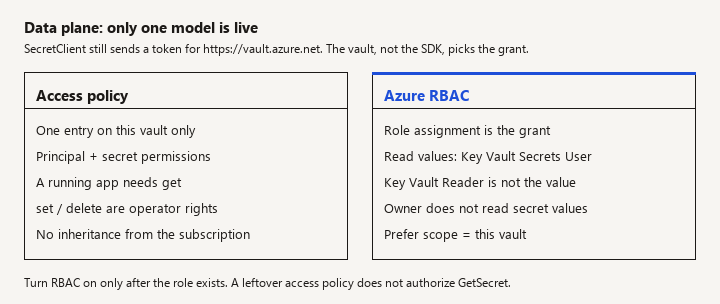
New to this -> use this page to pick the model and to read a 403. Related -> AKS workload identity if the caller is a pod rather than an App Service. Not this page -> binding secrets into IConfiguration, rotation callbacks, or certificate loading samples.
Which grant is actually live
Teams hit this when a vault was created with access policies, a platform group now requires RBAC, and a .NET app that used to read secrets started failing (or the reverse). You need the boundary between the two models, the roles that match the old checkboxes, and what not to grant. This is that comparison for application identities.
Two planes, then one switch
Watch: A vault uses one data-plane permission model. After you enable Azure RBAC, leftover access policies are not the live grant.
Azure splits Key Vault authorization into:
- Control plane. Create or delete the vault, change the permission model, set diagnostic settings, manage role assignments. Azure RBAC roles such as Owner or User Access Administrator apply here. These roles do not imply "can read secret values."
- Data plane. Get, list, set, and delete secrets, keys, and certificates. This is what
SecretClient.GetSecretuses.
The vault property that selects the data-plane model is the permission model: access policy, or Azure role-based access control. You set it at create time or convert later. While RBAC is enabled, data-plane access policies are not the effective grant. Leaving a policy in place "as a backup" does not authorize the app. While access policies are the model, assigning Key Vault Secrets User does not authorize the app either. The 403 text is easy to misread if you fix the wrong model.
Management-plane RBAC still exists in both modes. Someone must be allowed to change the vault. That person is not automatically allowed to read ConnectionStrings--Sql.
Access policies
An access policy is an entry on one vault that names a principal (user, group, service principal, or managed identity) and a set of secret, key, and certificate permissions (get, list, set, delete, and others).
Use this mental model:
- Scope is this vault only. There is no inheritance from a management group. Every new vault needs its own entries.
- The entry is the grant. If the app identity is missing, the call fails even if the human who deployed the app is Owner.
- Rights are fine-grained but easy to over-tick. "Get" is what a running ASP.NET Core app needs for configuration. "List" is convenient and also lets the identity enumerate names. "Set" and "delete" are operator rights. Production app identities should not have them unless the app truly writes secrets.
- Microsoft documents a maximum number of access policy entries on a vault (1024). If you are automating one entry per user instead of per group, you will eventually hit that operational limit. Prefer groups even on the policy model.
- The model is familiar and sufficient for a single app and a single vault. It is a poor fit for "the same identity should read secrets on every vault in this subscription," because you must touch every vault.
There is no PIM-style just-in-time story on an access policy entry comparable to Azure RBAC eligible assignments. Humans with standing get/list on production vaults are a reason teams leave the policy model.
Azure RBAC for the data plane
Watch: Owner and Key Vault Reader do not grant secret values. The app identity needs Key Vault Secrets User, assigned to the principal object id.
When the vault uses the RBAC permission model, you authorize data-plane calls with role assignments. The roles you actually want for .NET apps:
| App need | Role | Not this role |
|---|---|---|
| Read secret values at runtime | Key Vault Secrets User | Key Vault Reader (metadata, not values) |
| Create or update secret values (a deployer, not the web app) | Key Vault Secrets Officer | Owner |
| Read certificates for TLS or client auth | Key Vault Certificates User | A secrets role (different data type) |
| Sign or unwrap without exporting the key | Key Vault Crypto User | A role that allows key export, unless you truly need export |
Assign the role on the vault resource (or, when you have a reason, a broader scope -- resource group or subscription -- knowing it then applies to every vault in that scope). Broad scope is how a dev identity quietly gains production secrets. Prefer the vault.
The application object id you assign must be the identity the process uses:
- App Service / Functions system-assigned or user-assigned managed identity.
- The user-assigned identity behind an AKS workload identity.
- A local developer's user object only for a dev vault, not for production.
DefaultAzureCredential will try several credentials. The one that succeeds in Azure should be the managed identity you assigned. If a developer identity works locally against a dev vault and the app identity 403s in Azure, those are two principals. Fix the app's principal. Do not grant your personal account access to production to "confirm the code works."
RBAC helps when you need:
- The same role on many vaults via a resource-group or subscription assignment (used carefully).
- Access reviews, eligible assignments, and Privileged Identity Management for humans.
- A platform policy that forbids the access-policy permission model.
- Separation between "manage the vault" and "read secrets," which RBAC makes harder to collapse into one Owner checkbox.
RBAC costs an extra concept for small teams: role assignment propagation is not always instant. A pipeline that creates a vault, assigns Key Vault Secrets User, and immediately starts the app can race. Retry the first secret read, or sequence the deployment so the assignment exists before the app boots. That race looks like "RBAC is flaky." It is timing.
What .NET does, and does not, change
Your app still does this, on either model:
using Azure.Identity;
using Azure.Security.KeyVault.Secrets;

var vaultUri = new Uri(builder.Configuration["KeyVault:Uri"]!);
var client = new SecretClient(vaultUri, new DefaultAzureCredential());

// Called from a startup configuration provider or an explicit read.
// No secret string in source.
KeyVaultSecret secret = await client.GetSecretAsync("SqlPassword");
The client does not choose the permission model. Copy the grant that matches the vault's current model. The other one does not authorize get:
# Access policy model. Ignored for data-plane calls once the vault uses Azure RBAC.
az keyvault set-policy   --name clinic-kv   --object-id "$APP_IDENTITY_OBJECT_ID"   --secret-permissions get

# Azure RBAC model. Key Vault Secrets User on this vault, not Owner on the resource group.
az role assignment create   --assignee-object-id "$APP_IDENTITY_OBJECT_ID"   --assignee-principal-type ServicePrincipal   --role "Key Vault Secrets User"   --scope "$VAULT_RESOURCE_ID"
Nothing in the SecretClient snippet selects access policy versus RBAC. The credential supplies a token whose audience is the vault (https://vault.azure.net). The vault decides with the active model.
A 403 with a message about access policies means the model is policies and this object id has no entry (or lacks get). A 403 that names RBAC or authorization failed means the model is RBAC and this principal lacks a data-plane role. Read the body. Then open the vault's permission model blade and confirm which one is active before you edit entries.
Configuration providers (AddAzureKeyVault) fail the host at startup if the identity cannot read. That is a crash loop, not an intermittent bug. The fix is the grant, not a retry policy with a huge timeout. You may retry briefly for the propagation race above; do not hide a permanent 403.
Local development: DefaultAzureCredential can use the Azure CLI login. That identity needs a grant on the dev vault. Do not point the local app at the production vault URI to save a setup step.
Migration, in the only order that works
Watch: Create the role assignments first, then switch the permission model. Flipping the switch before the assignments is an outage.
- Inventory who can get secrets today (policy entries, plus anyone who is Owner and assumes that means read -- it does not, once you are on RBAC, but they may have a policy today).
- Create role assignments that match real needs before you flip the permission model. Secrets User for app identities. Officer for the deployment principal that writes secrets. No standing Officer for every developer if PIM is available.
- Switch the vault to Azure RBAC.
- Restart the app and read one secret.
- Remove the old access policies so the next operator does not "fix" the wrong blade.
Flipping the model first and assigning roles after is an outage. Assigning roles while the model is still access policy, and deleting policies, is also an outage. The effective model is the only one that counts.
Microsoft's direction has been to recommend the RBAC permission model for new vaults. New work should default there unless you have a written reason to keep policies (a tool that cannot assign roles, a vault you are not allowed to convert yet). Do not build a new platform feature on access policies because a 2019 script used them.
Pitfalls
- Owner instead of Secrets User. The app's identity as Owner on the resource group is a control-plane bomb and still might not be the role you think it is for data. Assign the data-plane role you mean.
- Key Vault Reader and then confusion. The app can list names in some setups and still cannot read the secret value. Configuration needs the value. Use Secrets User.
- Wrong identity. User-assigned identity is attached, but the app setting that selects the client id is missing, so a different identity gets the token. The role is on the identity you did not use.
- Secrets Officer on the running web app. A compromise of the app becomes a compromise of every secret the app can also overwrite. Get is enough for reads.
- Editing policies after enabling RBAC. The blade may still show historical policies. They are not the live grant.
- Subscription Owner "can see all secrets." They can often grant themselves a data role, which is an audit problem, but a secret read as Owner without a data role should fail. Test with the app identity, not with your portal account. The portal's secret browser uses your user, not the web app.
- Logging the secret after you finally get a 200, to prove RBAC works. Prove it with a length or a hash check in a private shell, then stop.
Verification
- The vault blade says the permission model you think it says.
- The principal id in the token (app identity client id / object id) matches the policy entry or the role assignment. Mismatched object id versus client id is a common portal mix-up; role assignments use the principal object id.
GetSecretfor a known name returns a value, andSetSecretfrom the same identity fails if you did not intend to allow writes.- A second vault in the same resource group is not readable unless you meant the assignment to be at resource-group scope.
- Application logs contain the 403 error code during a deliberate negative test with a spare identity, and do not contain the secret value during the positive test.
Boundaries
Reading the secret into options, caching it, and reloading on rotation are a different article. So is turning on a managed identity for App Service. This page stops at the grant. If the caller is an AKS pod, pair the RBAC assignment with workload identity: the role still has to exist, and the federated credential is what lets the pod obtain the token. Access policy versus RBAC does not change that federation step.
When the model matches the grant, the app identity is the principal you assigned, and a read-only role is all the process has, the permission-model decision is done.