Angular OIDC code flow with PKCE means the SPA redirects the browser to any OpenID Provider, comes back with a one-time authorization code, exchanges that code plus a secret only the browser knows (the PKCE verifier), and then calls ASP.NET Core with the access token as a bearer credential.
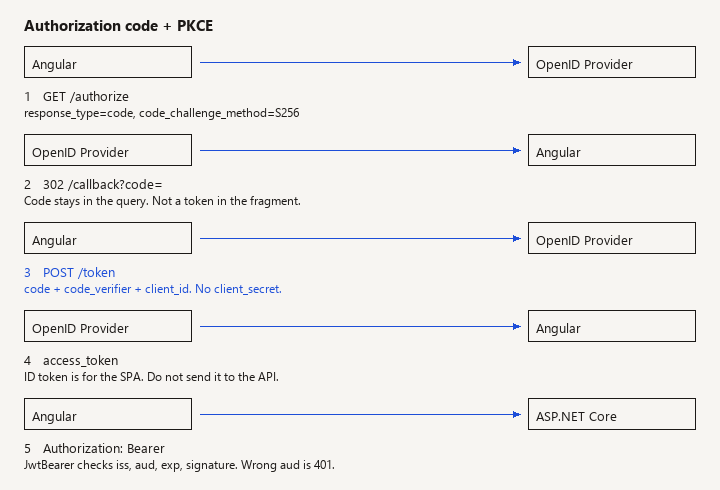
New to this -> read this page for the generic SPA PKCE path. Related -> Blazor WASM and Identity if the client is Blazor rather than Angular. Not this page -> Microsoft Entra app-registration walkthroughs, and any BFF that never exposes tokens to JavaScript.
What you wire, and what you skip
You already know the implicit flow should be gone. What you still need is what the SPA registers, what the library sends, what the API must check, and which failures look like "login works but every API call is 401." This is that wiring. It is not a tour of one vendor's portal, and it does not rank identity products.
When this applies
Use this shape when all of the following are true:
- The UI is an Angular single-page app loaded from a static host or from ASP.NET Core static files.
- Users sign in through an OpenID Provider you do not fully control inside the API process (Keycloak, Auth0, Entra, IdentityServer, Authentik, a company IdP).
- The API is a separate resource. It trusts tokens; it does not render the login page.
- You can register a public client, a redirect URI, and an API audience or scope.
Do not use this page as the design when:
- You want no tokens in the browser. Put a backend-for-frontend in front of the SPA and keep the session in an HttpOnly cookie. PKCE does not fix XSS stealing a token from memory or storage.
- The only identity store is ASP.NET Core Identity cookies on the same site, and Angular is same-origin MVC with cookie auth. That is cookie authentication, not OIDC code flow.
- You are configuring Entra-only extras (admin consent, Graph, enterprise app roles in the portal). The protocol below still applies; the portal clicks do not.
The interesting boundary: PKCE stops authorization-code interception. It does not stop a malicious script in the page from calling your API as the user after login. Keep using a Content Security Policy and avoid putting long-lived refresh tokens in localStorage unless you have accepted that tradeoff in writing.
The three roles
Keep the names straight or the configuration will be "almost right" forever.
| Role | Who | Holds |
|---|---|---|
| Public client | Angular | client_id, redirect URI, PKCE verifier. No secret. |
| OpenID Provider | The IdP | Users, passwords or federation, authorize and token endpoints, signing keys. |
| Resource server | ASP.NET Core | JWT validation parameters and your policies. No user password database required. |
The ID token is for the client (who logged in). The access token is for the API (what they may call). Angular may read the ID token to show a name. The API should authorize from the access token, not from an ID token the SPA forwards because it was convenient.
Register the public client
Watch: A browser app is a public client. A client secret in the Angular bundle is extractable; require PKCE S256 instead of shipping a confidential-client secret.
On the IdP, create a client with roughly this contract. Names differ by product; the protocol fields do not.
- Application type: public / SPA.
- Grant: authorization code. Implicit and hybrid off.
- PKCE: required, method
S256. If the IdP has "allow code without PKCE," leave that off. - Redirect URIs: exact origins you use, including local dev (
https://localhost:4200/callback) and production. Wildcards are a last resort and many IdPs refuse them. - Post-logout redirect if you will call end-session.
- Allowed scopes:
openidplus the API scope (apiorportfolio.api-- match what the API'saudor scope check expects). - Refresh tokens: only if the IdP supports rotation for public clients and you accept refresh tokens in the browser. Prefer short access-token lifetime plus a refresh token that rotates, over a 12-hour access token.
- CORS on the IdP token endpoint must allow the SPA origin if the token call is made from the browser (it is, in this design).
Do not create a confidential client and paste its secret into environment.ts. Anyone who can load the bundle can read it. The IdP will also reject a public client that presents a secret, or worse, accept the secret and train the team to ship it.
Angular: code flow that actually sends PKCE
Watch: response_type=token puts the access token in the fragment and skips PKCE. Register this client for the authorization code flow only.
angular-auth-oidc-client is a common fit because it owns the verifier, the callback, and silent renew. Pin a version that matches your Angular major. In current releases, responseType: 'code' uses PKCE unless you explicitly disable it. After you upgrade the library, confirm there is no disablePkce: true in config.
src/app/app.config.ts:
import { ApplicationConfig } from '@angular/core';
import { provideRouter } from '@angular/router';
import { provideHttpClient, withInterceptors } from '@angular/common/http';
import { provideAuth } from 'angular-auth-oidc-client';
import { routes } from './app.routes';
import { apiAuthInterceptor } from './core/api-auth.interceptor';

export const appConfig: ApplicationConfig = {
  providers: [
    provideRouter(routes),
    provideHttpClient(withInterceptors([apiAuthInterceptor])),
    provideAuth({
      config: {
        authority: 'https://idp.example.com/realms/portfolio',
        redirectUrl: `${window.location.origin}/callback`,
        postLogoutRedirectUri: window.location.origin,
        clientId: 'portfolio-spa',
        scope: 'openid profile email portfolio.api',
        responseType: 'code',
        silentRenew: true,
        useRefreshToken: true,
        renewTimeBeforeTokenExpiresInSeconds: 30,
        secureRoutes: ['https://api.example.com/'],
        // no clientSecret
      },
    }),
  ],
};
Trigger login from a button, not from the module constructor, so a failed IdP does not loop on every bootstrap:
import { Component, inject } from '@angular/core';
import { OidcSecurityService } from 'angular-auth-oidc-client';

@Component({
  selector: 'app-login',
  template: `<button type="button" (click)="signIn()">Sign in</button>`,
})
export class LoginComponent {
  private readonly oidc = inject(OidcSecurityService);

  signIn(): void {
    this.oidc.authorize();
  }
}
Add { path: 'callback', component: CallbackComponent } to the routes you already pass to provideRouter. The path has to match redirectUrl. Call checkAuth() once from the root so a reload restores the session and the callback URL finishes the code exchange. Do not call the API in that constructor.
import { Component, inject } from '@angular/core';
import { Router, RouterOutlet } from '@angular/router';
import { OidcSecurityService } from 'angular-auth-oidc-client';

@Component({
  selector: 'app-root',
  imports: [RouterOutlet],
  template: `<router-outlet />`,
})
export class AppComponent {
  private readonly oidc = inject(OidcSecurityService);
  private readonly router = inject(Router);

  constructor() {
    this.oidc.checkAuth().subscribe(({ isAuthenticated }) => {
      if (this.router.url.startsWith('/callback')) {
        void this.router.navigateByUrl(isAuthenticated ? '/' : '/unauthorized');
      }
    });
  }
}

@Component({
  selector: 'app-callback',
  template: `<p>Signing in.</p>`,
})
export class CallbackComponent {}
CallbackComponent stays empty of HTTP. The token is not ready until checkAuth() emits. /unauthorized is a static page, not a second login.
If secureRoutes does not match your API (different host per environment), attach the bearer yourself. Read the access token, not the ID token:
import { HttpInterceptorFn } from '@angular/common/http';
import { inject } from '@angular/core';
import { OidcSecurityService } from 'angular-auth-oidc-client';
import { switchMap } from 'rxjs';

export const apiAuthInterceptor: HttpInterceptorFn = (req, next) => {
  const apiBase = 'https://api.example.com/';
  if (!req.url.startsWith(apiBase)) {
    return next(req);
  }

  const oidc = inject(OidcSecurityService);
  return oidc.getAccessToken().pipe(
    switchMap((token) => {
      if (!token) {
        return next(req);
      }
      return next(
        req.clone({ setHeaders: { Authorization: `Bearer ${token}` } }),
      );
    }),
  );
};
Storage: the library defaults are documented per version. Prefer memory or session storage over a refresh token that survives for months in localStorage. Whatever you pick, assume XSS can read it. PKCE is not a substitute for sanitizing HTML and locking script-src.
Route guards (autoLoginPartialRoutesGuard or your own) only hide screens. The API still returns 401. Say that in code review so nobody treats canActivate as authorization.
ASP.NET Core: resource server
Watch: A valid signature is not enough. Without an audience or a required scope, a token minted for a different API on the same issuer is accepted here.
The API does not need the Angular client id as a secret. It needs the IdP's authority (for discovery and signing keys) and the audience your API was given.
using Microsoft.AspNetCore.Authentication.JwtBearer;

var builder = WebApplication.CreateBuilder(args);

builder.Services.AddAuthentication(JwtBearerDefaults.AuthenticationScheme)
    .AddJwtBearer(options =>
    {
        options.Authority = builder.Configuration["Auth:Authority"];
        options.Audience = builder.Configuration["Auth:Audience"];
        options.MapInboundClaims = false;
        options.TokenValidationParameters.NameClaimType = "preferred_username";
        options.TokenValidationParameters.RoleClaimType = "roles";
        options.TokenValidationParameters.ValidTypes = new[] { "at+jwt", "JWT" };
    });

builder.Services.AddAuthorization();

builder.Services.AddCors(options =>
{
    options.AddPolicy("spa", policy =>
        policy.WithOrigins(builder.Configuration.GetSection("Cors:Origins").Get<string[]>()!)
            .AllowAnyHeader()
            .AllowAnyMethod());
});

var app = builder.Build();

app.UseHttpsRedirection();
app.UseCors("spa");
app.UseAuthentication();
app.UseAuthorization();

app.MapGet("/api/profile", (HttpContext http) =>
{
    var sub = http.User.FindFirst("sub")?.Value;
    return Results.Ok(new { sub });
}).RequireAuthorization();

app.Run();
Configuration, not source, holds the authority and audience:
{
  "Auth": {
    "Authority": "https://idp.example.com/realms/portfolio",
    "Audience": "portfolio-api"
  },
  "Cors": {
    "Origins": [ "https://localhost:4200", "https://app.example.com" ]
  }
}
Authority must be the issuer that appears in the token's iss claim, not a friendly alias. JwtBearer downloads /.well-known/openid-configuration and the JWKS. In development, if the dev cert chain is untrusted, metadata fetch fails and every request is 401 with a log about the configuration manager. Trust the dev cert or point Authority at a host the API can TLS to. Do not set RequireHttpsMetadata = false outside a throwaway lab.
Audience: many IdPs put the API's identifier in aud. Some put a resource scope only in scope and set aud to the account id or to account. If you set options.Audience and the token's aud is different, validation fails even though the signature is good. Log SecurityTokenInvalidAudienceException before you "fix" it by turning validation off. Turning off audience checks makes every other API on that issuer acceptable to yours.
MapInboundClaims = false keeps JWT claim names (sub, roles) instead of the long SOAP-style inbound mappings. If you leave the default, [Authorize(Roles = "admin")] looks for a different claim type than the IdP emitted. Pick one mapping and test a role-gated endpoint.
CORS: the browser calls the API from the SPA origin. The bearer token is not a cookie, so you usually do not need AllowCredentials(). Do not combine AllowAnyOrigin() with credentials. List real origins.
Order: UseCors before authentication is the usual minimal-API setup so a browser preflight is not rejected as an anonymous 401. Preflight does not send Authorization.
Authorization stays in the API. A scope check is a start (RequireAssertion on the scope claim or a policy that demands portfolio.api). Object-level checks still belong on each route. A valid token is not permission to load every id.
What to verify in the browser
- The authorize redirect contains
response_type=code,code_challenge, andcode_challenge_method=S256. Ifcode_challengeis missing, you are not on PKCE. - The token request body contains
grant_type=authorization_code,code,code_verifier,client_id, andredirect_uri. It must not containclient_secret. redirect_urion the token call matches the authorize call exactly, including trailing slashes.- API requests send
Authorization: Bearerwith the access token. Decode it (a local decoder is enough) and confirmaudorscopematchesAuth:Audienceand the configured scope. Do not paste production tokens into random websites. - A call with no header returns 401. A call with the ID token in the header usually returns 401 as well if
auddiffers. That is correct. - After access-token expiry, the library renews once. Two parallel 401s should not start two full redirects. If they do, renew is mis-wired and users will see flicker.
Server logs that matter: IDX10214 / audience, issuer mismatch, and "Unable to obtain configuration." Those three cover most "the SPA says authenticated" bugs.
Pitfalls
- Implicit flow still documented in an old wiki.
response_type=tokenputs the token in the fragment and skips PKCE. Reject it in the client registration. - Code flow without PKCE. A stolen code from a log or a loose redirect URI can be redeemed. Require S256 at the IdP.
- Confidential client secret in the SPA. It will leak. Public client plus PKCE is the OAuth rule for this app type, not a temporary shortcut.
- API accepts any JWT signed by the IdP. Set audience or a required scope. Otherwise a token minted for a different API on the same issuer works here.
- Clock skew. A laptop clock five minutes off fails
nbf/exp. Fix the clock; do not widen skew to an hour. - Refresh token in localStorage. XSS becomes persistent account access. If the product cannot tolerate that, use a BFF.
- Silent renew in a third-party iframe. Browsers partition cookies.
useRefreshToken: trueavoids the hidden iframe for renewal, which is why the sample sets it. If you cannot use refresh tokens, test silent renew in the real browser, not only in a relaxed dev profile. - CORS "fixed" by reflecting Origin. Reflecting the request origin for an API that returns data is how you fail an audit. List origins.
- Logging the bearer token. Request logging middleware that dumps headers will ship tokens to the log sink. Redact
Authorization.
Production notes that are still this topic
Separate dev and prod clients so a localhost redirect URI is not registered on the production client. Rotate signing keys at the IdP without redeploying Angular; the API picks up JWKS if you do not pin a single kid in code. Cache the signing keys the way JwtBearer already does; do not GetStringAsync the JWKS on every request yourself.
Logout: call the library's logoff so it hits the end-session endpoint if you configured one. Clearing only the Angular service leaves the IdP session cookie, and the next authorize() will silently log the user back in. That looks like "logout is broken" and it is.
Multi-API: one SPA can request multiple audiences only if the IdP issues one token that all APIs accept, or if you use multiple clients / resource indicators. Do not forward one API's token to a second API that has a different audience and hope the second one skips validation. That is token passthrough, and it fails the moment audience checks are turned on (which they should be).
Related pages
This slug is the generic protocol. If the client is Blazor WebAssembly against ASP.NET Core Identity, the storage and the OIDC library are different; use Blazor WASM authentication. Dashboard deferral, OpenAPI, and Key Vault RBAC do not change this login. They only show up after the bearer call succeeds.
When the network trace shows code_challenge, the token call has code_verifier and no secret, and the API rejects a token with the wrong aud, you are done with this page.