Blazor WebAssembly authentication with ASP.NET Core Identity means the user accounts live in Identity on the server, and the WASM UI learns who the user is without ever holding a connection string or calling UserManager in the browser.
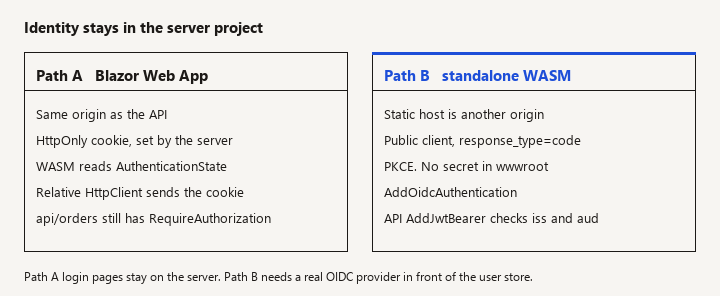
New to this -> pick Path A or Path B and follow that path only. Related -> Angular OIDC PKCE if the UI is Angular, not Blazor. Not this page -> Entra app registrations, and the .NET 10 API checklist.
Web App cookie or a standalone client
A lot of write-ups still show the three-project hosted WASM template with IdentityServer baked into the server. That template is not the current shape: Duende IdentityServer is not a free part of the framework templates, and new apps are steered toward the Blazor Web App with Individual Accounts, or toward a real OpenID Provider when the client is standalone WASM. This page is the current split, with the code you actually host.
When this applies
Use this page when the requirement is "our users are ASP.NET Core Identity users" and the UI runs on WebAssembly.
- Path A, prefer this for new UI. One Blazor Web App. Identity UI and endpoints stay on the server. Components can render on the server, and interactive islands can use WebAssembly. Authentication state is established by the server.
- Path B, when the WASM app is deployed separately from the API (static host, CDN, another origin). Treat WASM as a public OIDC client. Identity remains on the server as the user database behind an OIDC provider you operate (or a hosted IdP that federates to your users). The API is a resource server.
Do not use this page to put ApplicationDbContext inside the WASM project. The browser would need the database credentials. That is not a hosting trick; it is a leaked secret.
Do not follow a tutorial that adds AddIdentityServer from a package the template no longer includes, unless you are deliberately licensing and operating Duende. This page does not configure IdentityServer.
Path A: Blazor Web App and Identity
Watch: Identity stores users; it does not issue access tokens by itself. A hosted WASM plus IdentityServer tutorial will not match a current template.
Create the app from the Blazor Web App template with Individual authentication, or add Identity to an existing Web App the way the current ASP.NET Core Identity UI docs describe (AddIdentity / the Identity endpoint builder the template emits, plus EF Core migrations for the Identity schema). The important structural facts:
- The server project references Identity and EF Core. The client project, if you have a
.Clientassembly for interactive WASM components, does not reference the database provider. - Cookie authentication is configured on the server. The browser stores an HttpOnly cookie. WASM code does not read that cookie and copy it into
localStorage. - Interactive WebAssembly components see the user through
Task<AuthenticationState>and<AuthorizeView>, cascaded by the host. They do not callSignInManager.
A component that must not render for anonymous users:
@page "/orders"
@attribute [Authorize]
@rendermode InteractiveWebAssembly

<PageTitle>Orders</PageTitle>

<AuthorizeView>
    <Authorized>
        <p>Signed in as @context.User.Identity?.Name</p>
        <button type="button" @onclick="LoadAsync">Reload</button>
        @if (orders is not null)
        {
            <ul>
                @foreach (var order in orders)
                {
                    <li>@order.Id</li>
                }
            </ul>
        }
    </Authorized>
    <NotAuthorized>
        <p>Sign in to see orders.</p>
    </NotAuthorized>
</AuthorizeView>

@code {
    private List<OrderRow>? orders;

    [SupplyParameterFromServices]
    private HttpClient Http { get; set; } = default!;

    private async Task LoadAsync()
    {
        orders = await Http.GetFromJsonAsync<List<OrderRow>>("api/orders");
    }

    private sealed record OrderRow(Guid Id);
}
[Authorize] on a routable component in this model is enforced by the Blazor router when the authentication state says the user is anonymous. That hides the page. The API api/orders still needs its own [Authorize] (cookie scheme, if the call is same-origin and the cookie is sent). A WASM HttpClient call to a relative api/orders on the same host sends cookies according to the browser's same-origin rules. You do not attach an Authorization header unless you have deliberately switched this call to bearer tokens.
Server endpoint:
app.MapGet("/api/orders", (ClaimsPrincipal user, IOrderStore store) =>
{
    var userId = user.FindFirstValue(ClaimTypes.NameIdentifier);
    if (string.IsNullOrEmpty(userId))
    {
        return Results.Unauthorized();
    }
    return Results.Ok(store.ListForUser(userId));
}).RequireAuthorization();
Identity roles: add roles on the server with AddRoles<IdentityRole>() and role assignment through UserManager in a server-only admin page. Policy checks on the endpoint (RequireRole("clerk") or a named policy) are the enforcement. <AuthorizeView Roles="clerk"> only changes the UI.
Sign-in and registration pages stay the Identity UI pages the template serves from the server (Razor components that run on the server, not interactive WASM calling PasswordSignInAsync). If you rewrite login as an interactive WASM form that posts the password to a custom endpoint, you now own anti-forgery, lockout, and error messages. Prefer the Identity UI unless you have a reason to replace it.
Path A fails when you host the WASM app as a static site on a different origin and expect the cookie to be included. Browsers will not treat that as a same-site Identity session. Switch to Path B instead of loosening cookie SameSite to None for a cross-site SPA without a threat model. SameSite=None plus a cross-origin WASM client is a CSRF design you must justify, not a default.
Path B: standalone WASM, Identity on the server, tokens on the wire
Watch: Do not put a client secret in wwwroot. A standalone app on another origin uses a public client and PKCE, not a cookie copied into JavaScript.
Use this when index.html is served from a different origin than the API. Pieces:
- User store. ASP.NET Core Identity in the API host or in a dedicated auth host. Passwords never go anywhere except that host's login page or a token endpoint owned by an OIDC provider.
- OIDC provider. Identity does not become an OIDC server because you called
AddIdentity. You need a real authorization server that uses Identity (or your own user table) as its store, or you need a BFF that keeps tokens on the server. Pick one product and operate it. Do not invent aMapPost("/connect/token")that signs JWTs with a symmetric key fromappsettings.jsonand call it OIDC. Home-grown token endpoints miss rotation, PKCE enforcement, and logout. - WASM client.
Microsoft.AspNetCore.Components.WebAssembly.Authentication. Public client, authorization code with PKCE, no client secret inwwwroot.
Client registration in the WASM Program.cs:
builder.Services.AddOidcAuthentication(options =>
{
    options.ProviderOptions.Authority = "https://idp.example.com";
    options.ProviderOptions.ClientId = "portfolio-blazor-wasm";
    options.ProviderOptions.ResponseType = "code";
    options.ProviderOptions.DefaultScopes.Add("portfolio.api");
    // PKCE is part of the code flow for this handler.
    // Do not set a client secret.
});
wwwroot/appsettings.json can hold authority and client id (they are public). It must not hold a secret or a connection string. Redirect URIs registered at the IdP include https://your-wasm-host/authentication/login-callback.
Routes in the WASM Routes / App router, matching the package's remote authenticator:
<Router AppAssembly="typeof(Program).Assembly">
    <Found Context="routeData">
        <AuthorizeRouteView RouteData="routeData" DefaultLayout="typeof(MainLayout)">
            <NotAuthorized>
                <p>You are not authorized.</p>
            </NotAuthorized>
        </AuthorizeRouteView>
    </Found>
</Router>
And a page for the library's actions:
@page "/authentication/{action}"
@using Microsoft.AspNetCore.Components.WebAssembly.Authentication

<RemoteAuthenticatorView Action="@Action" />

@code {
    [Parameter] public string? Action { get; set; }
}
Attach tokens only to the API, with AuthorizationMessageHandler, so you do not send the bearer token to random hosts:
builder.Services
    .AddScoped<CustomAuthorizationMessageHandler>();

builder.Services.AddHttpClient("Api", client =>
{
    client.BaseAddress = new Uri("https://api.example.com/");
}).AddHttpMessageHandler<CustomAuthorizationMessageHandler>();

builder.Services.AddScoped(sp =>
    sp.GetRequiredService<IHttpClientFactory>().CreateClient("Api"));
public sealed class CustomAuthorizationMessageHandler
    : AuthorizationMessageHandler
{
    public CustomAuthorizationMessageHandler(
        IAccessTokenProvider provider,
        NavigationManager navigation)
        : base(provider, navigation)
    {
        ConfigureHandler(
            authorizedUrls: new[] { "https://api.example.com" },
            scopes: new[] { "portfolio.api" });
    }
}
The API validates JWTs the same way any resource server does: AddJwtBearer, authority of the IdP, audience of this API. It can still use Identity's user table for administration. It should not also accept the Identity cookie on a cross-origin WASM call unless you have deliberately built a BFF.
Roles in Path B belong in the access token (or a lookup the API does from the sub claim). Do not trust a role the WASM app stores in memory if the API does not check it again.
Shared rules
Watch: AuthorizeView in the browser is not authorization. The API still needs the policy, or an anonymous request returns every row.
- Authorization is server-side.
AuthorizeViewand[Authorize]on a component stop a curious user from seeing a menu. They do not stopcurl. - Persisted component state and prerender. If a component prerenders on the server with user-specific data, do not embed secrets in the persisted state, and do not let an anonymous prerender cache a personalized response at a CDN.
- Logout. Path A: Identity's server logout endpoint clears the cookie. Path B: the OIDC library must hit the end-session endpoint or the IdP will silently sign the user back in.
- Local development HTTPS. Both the WASM host and the API need stable URLs. Redirect URI mismatches fail the code flow before Identity is involved. Fix the URI; do not disable PKCE.
- Account linking and emails. Confirmation emails and password reset are server features (Identity token providers). The WASM app only links to those server pages. Do not generate password-reset tokens in the browser.
.NET 8 and later Blazor Web Apps can mix render modes. A common mistake is marking the login page InteractiveWebAssembly and then having no server circuit to complete the cookie sign-in. Keep account management on the server render mode the Identity UI expects.
Passkeys and other Identity UI additions in newer releases belong to the server's Identity stack. They do not move the user database into WASM. Check the framework docs for the version you run before you copy a passkey snippet; the API surface moved during .NET 10 previews and the stable template is the source of truth.
Pitfalls
- Following a hosted WASM + IdentityServer tutorial on a current SDK. The project system will not match. Stop and choose Path A or Path B.
AddAuthenticationStateDeserializationmissing or doubled in a Web App that interactive-WASM components cannot see the user for. The template wires this. If you created the host by hand, compare it with a new template rather than guessing claim types.- HttpClient in WASM without a base address, so
api/ordersresolves against the static host and 404s. That 404 is not an Identity failure. - CORS with
AllowAnyOriginand cookies on Path A because a dev box used a different port. List the real origin. Better: same origin. - Client secret in
wwwroot. It ships to every browser. Public client plus PKCE only. - Custom JWT middleware that accepts unsigned tokens "until the IdP is ready." It will still be there next quarter.
- Roles only in
AuthorizeView. The API returns every order. Add the policy on the endpoint and test with an anonymous request. - Sharing one
AuthenticationStateProviderimplementation copied from a 2020 gist that readslocalStorage. You will fight the framework package. UseAddOidcAuthenticationor the Web App's cascaded state.
Verification
Path A:
- Register a user through the server UI. Confirm a row exists via EF, not via a WASM debug view.
- Open an
[Authorize]page signed out. You get the login redirect or the not-authorized UI, andGET /api/orderswithout the cookie returns 401. - Sign in. The interactive WASM component shows the name. The orders call returns only that user's rows.
- Sign out. The cookie is gone (browser devtools, application cookies). The API returns 401 again.
Path B:
- The authorize redirect includes
response_type=codeand a PKCE challenge. The token request has no client secret. - The access token's
issandaudmatch the API's JwtBearer settings. - The WASM origin is not the API origin, and a request without a bearer token is 401.
- Logout at the IdP. Refreshing the WASM app does not silently restore the session.
Both paths: the WASM published output contains no connection string. Search the published wwwroot and _framework files if you are not sure. A compiler reference to UseSqlServer in the client project is a failed review.
Boundaries
Angular clients use a different library and the same OIDC rules; see Angular OIDC code flow with PKCE. Framework release notes (OpenAPI, Minimal API validation, passkey templates) are summarized on .NET 10 ASP.NET Core highlights and should not be mixed into this login design.
You are done when the user store is only on the server, the UI's auth state matches the way it is hosted (cookie cascade or OIDC PKCE), and every data endpoint authorizes the call again.