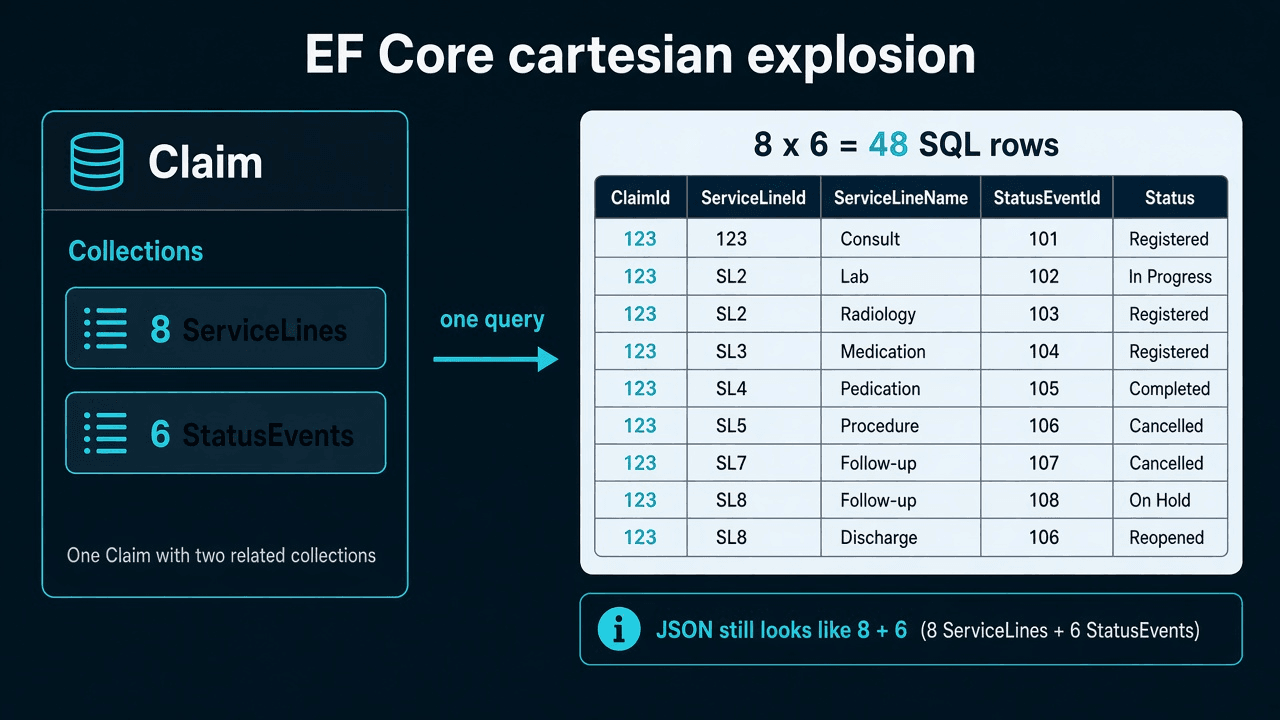
Cartesian explosion in EF Core happens when one query Includes two collections on the same parent. SQL Server JOINs both children, so raw row count becomes collectionA.Count × collectionB.Count — not 1 + A + B. EF deduplicates back into the graph you expected. The JSON looks correct. The tax is logical reads, network, and CPU.
Claim with 8 lines, 6 events — one query, two collection Includes

  SQL rows returned:  8 × 6 = 48  (not 1 + 8 + 6 = 15)
  C# graph after EF:  1 claim, 8 lines, 6 events  ✓
  SSMS row count:     48  ← the signal
New to this → stay here. Merging a PR → confirm in five minutes. On-call / interview → fixes in order · if an interviewer asks.
Terms used here: Collection Include = Include on a one-to-many navigation (ServiceLines, StatusEvents). Cartesian product = every row from set A paired with every row from set B in a JOIN. AsSplitQuery = EF issues separate SELECTs per collection instead of one multiplied JOIN.
The C# looks innocent. The JSON looks correct. SQL Server returns thousands of rows for one order. This is not N+1 — that is many small queries. This is one query that got fat.
The query that lies in the debugger
var claim = await db.Claims
    .Include(c => c.ServiceLines)
    .Include(c => c.StatusEvents)
    .SingleAsync(c => c.Id == claimId, ct);
You inspect claim.ServiceLines.Count (8) and claim.StatusEvents.Count (6). The object is right. The SQL was:
-- illustrative shape, not a vendor script
SELECT [c].*, [s].*, [e].*
FROM Claims AS [c]
LEFT JOIN ClaimLines AS [s] ON [c].[Id] = [s].[ClaimId]
LEFT JOIN ClaimEvents AS [e] ON [c].[Id] = [e].[ClaimId]
WHERE [c].[Id] = @id
Row count in the raw result ≈ 8 × 6 = 48, not 1 + 8 + 6. Every line is paired with every event. Add a third collection and you multiply again.
EF Core deduplicates into the graph you expected. Your API still serializes 8 lines and 6 events. The tax is logical reads, network, and CPU on the stitch. On a claim with 40 lines and 30 events, you are in four-digit row counts before business logic runs.
I have seen this on:
- Order + lines + payments (eCommerce)
- Visit + diagnoses + notes (healthcare)
- Listing + images + bids (marketplace)
Demo data has 2 lines and 1 payment. Production has 80 and 12. That is why staging never caught it.
How to confirm in five minutes
- Log the SQL (
RelationalEventId.CommandExecuted) in Development. - Run it in SSMS with Include Actual Execution Plan.
- Look at Number of Rows Read / actual rows, not the C# counts.
- If actual rows ≈ product of collection sizes, you have this bug.
Enable the warning EF already has:
options.ConfigureWarnings(w =>
    w.Throw(RelationalEventId.MultipleCollectionIncludeWarning));
Throw in Development. I would rather fail a PR than discover this on a Monday export job.
Fixes, in the order I try them
1. Stop including graphs the Angular screen does not need
Detail pages often need lines or a timeline, not both in one GET. Two endpoints, or one endpoint with ?include=events that never loads both collections in one JOIN.
Projection for the screen you ship:
var header = await db.Claims
    .AsNoTracking()
    .Where(c => c.Id == claimId)
    .Select(c => new ClaimDetailDto(
        c.Id,
        c.Status,
        c.ServiceLines.Select(l => new LineDto(l.Id, l.Code, l.Amount)).ToList()))
    .SingleAsync(ct);
Events load on a second call when the user opens the history tab. Less heroic. Faster.
2. AsSplitQuery when you truly need both collections
var claim = await db.Claims
    .AsSplitQuery()
    .Include(c => c.ServiceLines)
    .Include(c => c.StatusEvents)
    .AsNoTracking()
    .SingleAsync(c => c.Id == claimId, ct);
EF issues separate SELECTs. Row counts match collection sizes. See Include vs AsSplitQuery for when split is the wrong default.
Wrap in a transaction if the two collections must be a consistent snapshot:
await using var tx = await db.Database.BeginTransactionAsync(ct);
var claim = await /* split query */;
await tx.CommitAsync(ct);
3. Two queries you own (often clearer than Include)
var claim = await db.Claims.AsNoTracking().SingleAsync(c => c.Id == claimId, ct);
var lines = await db.ClaimLines.AsNoTracking()
    .Where(l => l.ClaimId == claimId)
    .ToListAsync(ct);
var events = await db.ClaimEvents.AsNoTracking()
    .Where(e => e.ClaimId == claimId)
    .ToListAsync(ct);
No Include magic. Easy to index. Easy to page lines independently of events. This is what I use when the Angular view is two panels anyway.
4. Do not “fix” it with AsNoTracking alone
AsNoTracking reduces tracker cost. It does not stop the JOIN from multiplying rows. Tracking vs no-tracking is a different article.
Filtered Include does not cancel the product
.Include(c => c.ServiceLines.Where(l => !l.IsVoided))
.Include(c => c.StatusEvents)
You still JOIN two collections in one statement unless you split. Filters shrink each collection; they do not change the algebra. If 5 lines remain and 6 events remain, you still have ~30 raw rows.
When I leave a single multi-Include in place
Tiny collections, cold endpoint, measured row counts in the tens, team refuses two round-trips. I still add a comment and a warning-as-error in Development so the next feature does not add Include(c => c.Attachments) and quietly go exponential.
If an interviewer asks
The claim detail endpoint is slow. Include has ServiceLines and StatusEvents. What is wrong?
30-second answer: Two collection Includes in one query multiply JOIN rows. Eight lines and six events become forty-eight SQL rows, not fifteen. Fix with AsSplitQuery, two separate queries, or stop loading both collections on one GET.
Strong answer: I'd log the SQL, run it in SSMS with actual execution plan, and compare rows read to the C# collection counts. If actual rows ≈ product of collection sizes, that is cartesian explosion — not N+1, not missing indexes. I'd prefer splitting the API (lines on one tab, events on another) or projecting only what the screen needs. AsSplitQuery is the fallback when both collections must arrive in one request; I'd wrap it in a transaction if snapshot consistency matters. AsNoTracking alone does not fix this — the JOIN already multiplied rows before materialization.