EF Core connection pooling is ADO.NET behavior: Microsoft.Data.SqlClient keeps physical SQL connections in a pool per connection string so Open() is often a checkout, not a new TCP handshake. EF Core borrows one of those connections for a command and returns it when the context disposes the connection. If you do not return it, the pool hits Max Pool Size and the next request waits until Connect Timeout, then fails.
New to this - stay here for pools. Retries - EF Core SQL retry. Context lifetime and aggregates - aggregate design. Many databases - multi-tenancy.
How does EF Core connection pooling actually work?
Search intent for ef core connection pooling is a how-to. The error they already have, or will have, reads like: "Timeout expired. The timeout period elapsed prior to obtaining a connection from the pool. This may have occurred because all pooled connections were in use and max pool size was reached." They want to know whether EF turned pooling off, whether AddDbContextPool fixes it, and which setting to raise. Raising Max Pool Size is the last step, not the first.
This page is not EnableRetryOnFailure. A retry policy assumes the server had a transient fault. A drained pool is your process holding connections. Retrying that timeout holds threads longer and drains nothing back into the pool.
When does this apply?
ASP.NET Core using EF Core with UseSqlServer (or a direct SqlConnection) against SQL Server or Azure SQL. Pooling defaults to on. You opt out only with Pooling=false, which you should not set to "make leaks visible" on production; it will open a physical connection per operation and fall over differently.
Postgres and MySQL have their own drivers and pool settings. The leak patterns are the same. The connection-string keys below are SqlClient keys.
How is the SQL pool different from AddDbContextPool?
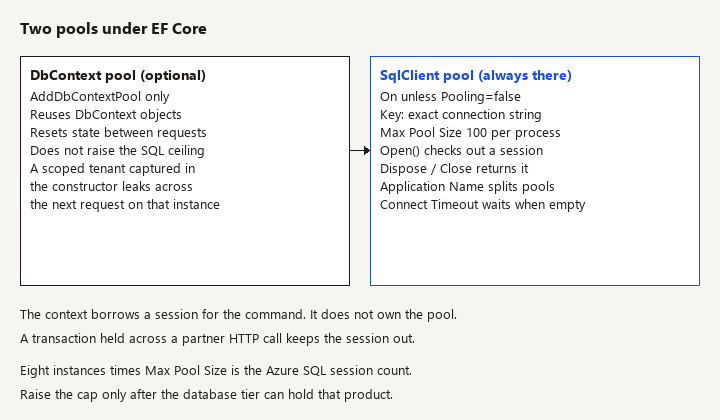
Watch: AddDbContextPool reuses context objects. SqlClient pools TCP sessions. Raising Max Pool Size before you dispose contexts only moves the outage onto the database session cap.
SQL connection pool. Owned by SqlClient. Default Max Pool Size is 100 per distinct connection string per process. Min Pool Size is 0. A closed SqlConnection returns to the pool. Dispose is how you close it when you used await using.
DbContext pool. Owned by EF Core when you call AddDbContextPool. It reuses context objects to avoid setup cost and resets state between requests. The context still opens a SQL connection per operation (unless you explicitly hold one). Pooling contexts does not raise the SQL ceiling above 100. It also must not capture a scoped tenant in the constructor and then hand that instance to the next request. If the query filter closed over the first tenant, context pooling becomes a data leak. Prefer AddDbContext when the context depends on a scoped ITenantContext, or reset the tenant from the current request every time the context is leased.
builder.Services.AddDbContext<ClinicDbContext>(options =>
{
    // SqlConnectionStringBuilder is Microsoft.Data.SqlClient.
    // A different Application Name is a different pool.
    var connectionString = new SqlConnectionStringBuilder(
        builder.Configuration.GetConnectionString("Clinic"))
    {
        ApplicationName = "clinic-api"
    }.ConnectionString;

    options.UseSqlServer(
        connectionString,
        sql => sql.EnableRetryOnFailure(
            maxRetryCount: 5,
            maxRetryDelay: TimeSpan.FromSeconds(10),
            errorNumbersToAdd: null));
});
Leave pooling at the driver default. Do not add Pooling=true as a cargo-cult flag and also set Max Pool Size=1000 because a chart looked red. One thousand sessions from one app instance will hurt Azure SQL more than it will help the app.
What is the connection pool key?
Watch: A different Application Name, database, or extra semicolon is a different pool. Do not append a correlation id to the connection string.
The key is the connection string SqlClient sees, plus the identity of the pool (process, and for many versions the app domain / client app context). These create different pools:
- a different
Application Name - a different database name (database-per-tenant)
- a trailing semicolon or a keyword spelled with different spacing
- a different user id or authentication method
- one string built with
TrustServerCertificate=Trueand one without
Ten tenants with ten connection strings means ten pools, each allowed Max Pool Size connections. Set Min Pool Size=10 on a template you clone per tenant and a quiet day still opens 10 sessions times tenant count at startup. For database-per-tenant, keep Min Pool Size at 0 unless you have measured a login storm, and cap how many tenant pools a single instance will touch.
Do not build the connection string by concatenating untrusted input beyond a tenant-to-database map you control. And do not log the full string; it may contain a password if you are still on SQL authentication. Prefer Authentication=Active Directory Default or a managed identity so the secret is not part of the pool key at all. Password rotation changes the string and therefore the pool; old pools idle out. That is fine. Two strings that differ only by a secret you rotate every hour will fragment pools if both stay in use.
EF and hand-written ADO.NET share a pool when the connection string matches exactly and both use Microsoft.Data.SqlClient. A reporting path that uses System.Data.SqlClient (the older assembly) does not share that pool. You will see two ceilings and wonder why EF "only" has 100 while the process has 180 sessions. Standardize on Microsoft.Data.SqlClient.
How does EF Core return a connection?
Watch: A BackgroundService that resolves a scoped context from the root provider and never disposes it holds the session. The using on the scope is what returns it.
For a normal scoped DbContext, each request gets a context, runs queries, and disposes the context at the end of the request. Dispose closes the connection EF opened. You do not call Open yourself, and you should not call Database.OpenConnection() unless you also CloseConnection in a finally. An explicit open that lives until the context dies will hold a session for the whole request, including the time you spend in an external HTTP call. That is a pool leak you wrote on purpose.
Patterns that hold a connection too long:
- a transaction opened at the start of the controller and committed after a slow partner HTTP call
await usingmissing, and a context stored in a singleton or a static- synchronous blocking (
.Result) on a call that itself needs a connection, so threads and connections stall together - streaming a large result to the client while the reader is open, and the client is slow
MultipleActiveResultSets=trueused to paper over nested queries. It holds one session for overlapping readers and hides an N+1 that should be a rewrite- a
BackgroundServicethat resolves a scoped context from the root provider and never disposes it
The worker pattern is a scope per unit of work, then dispose:
await foreach (var id in queue.Reader.ReadAllAsync(stoppingToken))
{
    using var scope = scopeFactory.CreateScope();
    var db = scope.ServiceProvider.GetRequiredService<ClinicDbContext>();
    var job = await db.Jobs.SingleAsync(j => j.Id == id, stoppingToken);
    job.MarkDone();
    await db.SaveChangesAsync(stoppingToken);
}
The using is the pool return. A retry policy around SaveChangesAsync is optional and belongs to the resiliency article. It does not change the using.
Why is raising Max Pool Size the wrong first fix?
Connect Timeout (default 15 seconds) is how long Open waits, including the wait for a free pooled connection. It is not the command timeout. Command Timeout (default 30 seconds) is how long a query may run after you have a connection. Raising Connect Timeout to 120 when the pool is empty makes requests sit in the ASP.NET Core queue until the thread pool is unhappy. Raising Max Pool Size without finding the holder moves the outage from "timeouts" to "Azure SQL session limit" or lock storms.
Find holders first:
- Snapshot
sys.dm_exec_sessionsfor yourprogram_name(setApplication Name=clinic-apiso this is obvious) and count sessions by status. - If the count is near
Max Pool Sizetimes instance count, you are at the ceiling. If the count is small but the app says the pool is exhausted, you have many pools (string fragmentation) or more instances than you think. - Turn on EF command logging in a staging repro, or use
dotnet-counters/ metrics for the process. Look for requests that do I/O to other systems inside a transaction. - In a test, resolve
ClinicDbContextfrom a singleton and watch the pool timeout appear under load. Then put theusingback and watch it disappear. That is a better demo than a production max-pool change.
Azure SQL also has a gateway and a database session cap tied to the service tier. A pool of 100 on eight instances is 800 sessions before background jobs. The tier might reject logins while each process still thinks it has spare pool. Size the pool to the tier, not to a blog default.
Why do retries make an empty pool worse?
EnableRetryOnFailure retries errors SqlClient considers transient. A pool timeout can surface as a timeout worth retrying, depending on the exception. Retrying it allocates nothing useful: there is still no free connection, and each retry occupies a thread for another Connect Timeout. If you see retry logs during pool exhaustion, disable retries for that error or fix the leak before you add attempts. The resiliency post's rule still holds: do not retry a bug. Holding a connection across a call is a bug.
Execution strategy and user transactions are a separate foot-gun (the strategy must own the transaction). That topic stays on the retry page. Pooling does not require you to wrap reads in a transaction.
What changes with multiple instances or serverless SQL?
Each process has its own pools. A slot swap or a scale-out to ten pods multiplies sessions immediately if Min Pool Size is high or if every pod hits every tenant database. On scale-in, pools die with the process; SQL may show sessions in a disconnecting state for a bit. That is not a leak by itself.
Serverless Azure SQL pausing is hostile to a warm pool: the first Open after pause pays a resume delay and may time out. Raise Connect Timeout only for that specific cold start, or ping on a timer with your eyes open about cost. Do not "fix" pause with Min Pool Size on a database you wanted to scale to zero.
What fails in review?
Pooling=falseleft in a production string after a debug session.- A new connection string per request because a cache-buster or a correlation id was written into
Application Name. AddDbContextPoolplus a scoped tenant captured once. Wrong tenant and a confusing pool story. Fix the lifetime first.- Singleton
SqlConnection. One connection cannot serve the app, and concurrent commands will fail or serialize. - Opening a second context per request for no reason (one for reads, one for writes) and doubling checkout count.
- Reading
GetConnectionStringand then appending secrets in code so the deployed string no longer matches the one you tested. - Treating connection pooling as a cache of query results. It caches sessions only. Query caching is a different feature and a different post.
How do you verify connections are returned?
- Log or metric the distinct connection string shapes (database name and auth mode, never the secret) at startup. Expect one shape per database you meant to use.
- Under a load test, session count on SQL for
program_name = clinic-apistays near the number of concurrent requests that are actually inside a query, not near 100 sitting idle-busy. After the test, busy sessions fall back. - A 50-parallel integration test against a local SQL container completes without the pool timeout. Remove a
Disposeand confirm the same test fails with the pool message. PutDisposeback. - With two connection strings that differ only by
Application Name, confirm SQL shows two groups of sessions. Then make them identical and confirm they share the ceiling. - Run a request that calls a slow HTTP dependency. SQL sessions for that request are not held for the whole HTTP call (profiler or
dm_exec_sessionswhile the call is in flight). If they are, you opened the transaction too early. - Confirm retry logs do not fire on the pool timeout once the leak is gone. If they do, you are retrying the wrong failure. See the resiliency post before adding attempts.
What should you change, in order?
Dispose every context and every explicit connection. Pull non-database I/O out of transactions. Collapse equivalent connection strings. Set Application Name. Only then change Max Pool Size, and only to a number the database tier can hold times the maximum instance count. Pooling is already on. The work is returning what you borrowed.