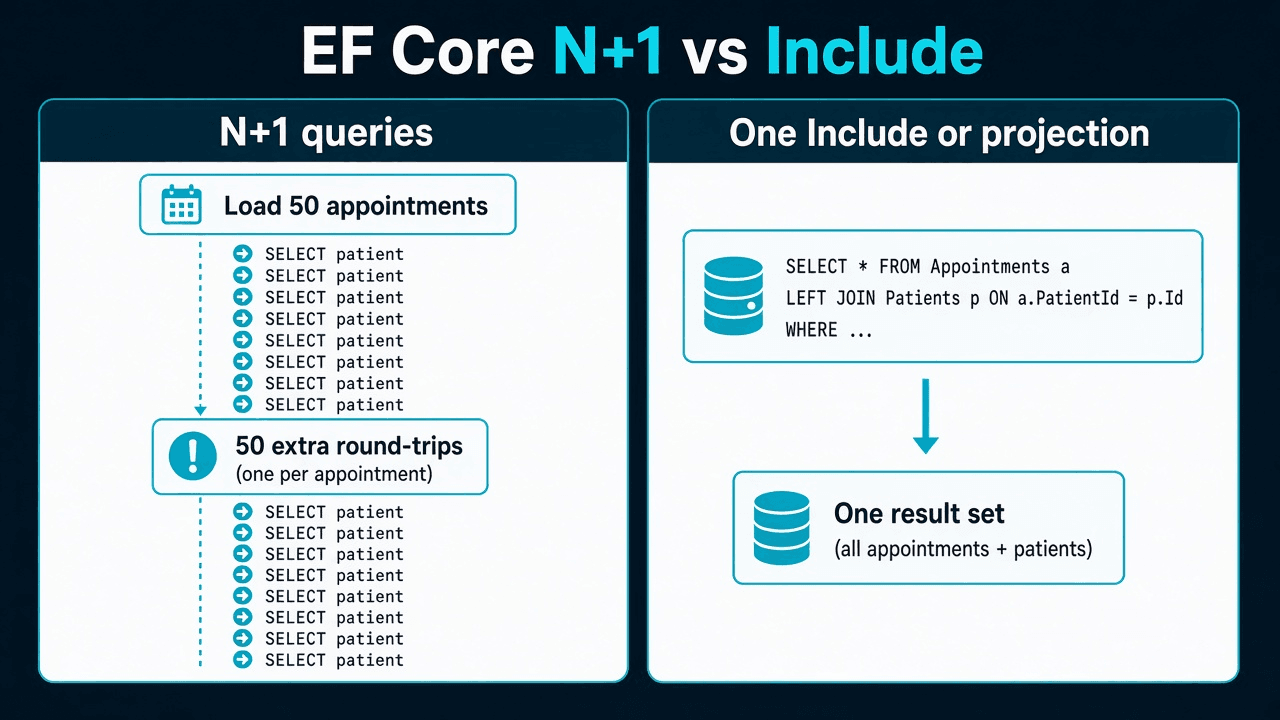
The N+1 problem in EF Core means one query loads a list, then the handler touches a navigation property in a loop — triggering one additional SQL round-trip per row. Fifty appointments become fifty-one commands. The JSON still looks correct.
N+1 (too many queries)              Include one reference (one JOIN)

  SELECT 50 appointments              SELECT appointments + patients
  foreach → SELECT patient (×50)      one statement, one JOIN
  51 round-trips                      not N+1

  Two collection Includes?            That is cartesian explosion —
  wrong fix →                         see the other post
New to this → stay here. Merging a PR → how N+1 shows up. On-call / interview → quick map · if an interviewer asks.
Terms used here: Lazy loading = EF issues a SQL query when you first touch an unloaded navigation. Projection = Select to a DTO in LINQ so SQL returns only the columns the screen needs. AsSplitQuery = separate SELECTs per collection — fixes cartesian explosion, not N+1.
The Angular schedule loaded fifty appointments. SQL Server showed fifty-one commands.
This page is that bug. It is not cartesian explosion. If the dashboard is "generally slow," start at the EF Core SQL performance checklist.
How N+1 shows up
var appointments = await db.Appointments
    .Where(a => a.ClinicId == clinicId && a.Start >= from && a.Start < to)
    .OrderBy(a => a.Start)
    .Take(50)
    .ToListAsync(ct);

foreach (var row in appointments)
{
    dto.Add(new AppointmentRow(row.Id, row.Patient.FullName, row.Start));
}
Demo data: two patients, nobody notices. Production: fifty lazy loads (or fifty explicit loads) while Angular waits. Application Insights shows SQL dependency count, not one slow statement.
I see the same shape on order lists that touch Seller, claim lists that touch Provider, and marketplace search that hydrates Category in a loop after ToList.
Confirm it before you Include the world
- Log commands in Development (
RelationalEventId.CommandExecuted). - Count statements for one HTTP request — not duration of the first
SELECT. - If count ≈
1 + pageSize, you have N+1.
If count is one and SSMS row count is lines × events, stop. That is cartesian explosion. Do not “fix” it by adding another Include.
Fix 1: project the screen (usually the right fix)
List endpoints should not return entity graphs.
var rows = await db.Appointments
    .AsNoTracking()
    .Where(a => a.ClinicId == clinicId && a.Start >= from && a.Start < to)
    .OrderBy(a => a.Start)
    .Select(a => new AppointmentRowDto(
        a.Id,
        a.Patient.FullName,
        a.Start,
        a.Status))
    .Take(50)
    .ToListAsync(ct);
One SQL statement. SQL Server joins Patient once. Angular gets four fields. No tracker. This is what I merge for grids.
Fix 2: Include when you truly need the graph
Detail pages, or a handler that must mutate Patient in the same request:
var appointments = await db.Appointments
    .Include(a => a.Patient)
    .AsNoTracking()
    .Where(a => a.ClinicId == clinicId)
    .Take(50)
    .ToListAsync(ct);
Include a reference (Patient) is a JOIN, not N+1. Include one collection (Lines) is also not cartesian explosion. Cartesian starts at two collection Includes on the same query.
Do not Include six navigations “so N+1 cannot happen.” You will trade round-trips for a JOIN product. That failure lives on the cartesian explosion URL.
Fix 3: AsSplitQuery is not the N+1 hammer
AsSplitQuery tells EF to load collections in separate SELECTs instead of one multiplied JOIN. Use it when you already decided two collections belong on one request:
var claim = await db.Claims
    .AsSplitQuery()
    .Include(c => c.ServiceLines)
    .Include(c => c.StatusEvents)
    .AsNoTracking()
    .SingleAsync(c => c.Id == claimId, ct);
That is three round-trips on purpose. It is the opposite of “I had N+1 and I wanted fewer queries.” If you only needed patient names on a list, split query is ceremony. Prefer the projection.
Split queries can see a consistency window between statements. On SQL Server I rely on read committed snapshot or wrap the split in a transaction when the two collections must match one snapshot.
When I leave a loop in place
Rare: a follow-up query that cannot be expressed as a JOIN (a different database, an HTTP call). Then I batch IDs:
var patientIds = appointments.Select(a => a.PatientId).Distinct().ToArray();
var patients = await db.Patients
    .AsNoTracking()
    .Where(p => patientIds.Contains(p.Id))
    .ToDictionaryAsync(p => p.Id, ct);
Two queries, not 1 + N. Still not Include of two collections.
Quick map
| What you see | Name | This URL? |
|---|---|---|
1 + pageSize SQL commands | N+1 | Yes |
One command, row count ≈ A × B | Cartesian explosion | Other post |
| One clinic fast, hub clinic times out | Parameter sniffing | Sniffing post |
Same Patient is two CLR objects on a read | Identity resolution | AsNoTracking post |
Interview narration for concurrency tokens and query filters is EF Core interview questions, not this page.
If an interviewer asks
Fifty appointments load in one query, but Application Insights shows fifty-one SQL commands. What is happening?
30-second answer: N+1. The handler touches appointment.Patient in a loop after ToList. Fix with a projection (Select to a DTO) or Include on the reference navigation — one JOIN, not fifty lazy loads.
Strong answer: I'd count SQL commands for one HTTP request in Development logging, not statement duration. If count ≈ 1 + pageSize, that is N+1. I'd project the grid in one Select — that is my default for list APIs. Include is for when I genuinely need the entity graph in the same request. AsSplitQuery is for two collection Includes (cartesian explosion), not for N+1 — it adds round-trips on purpose. If command count is one but SSMS row count is a product of collection sizes, I stop and read the cartesian post instead.