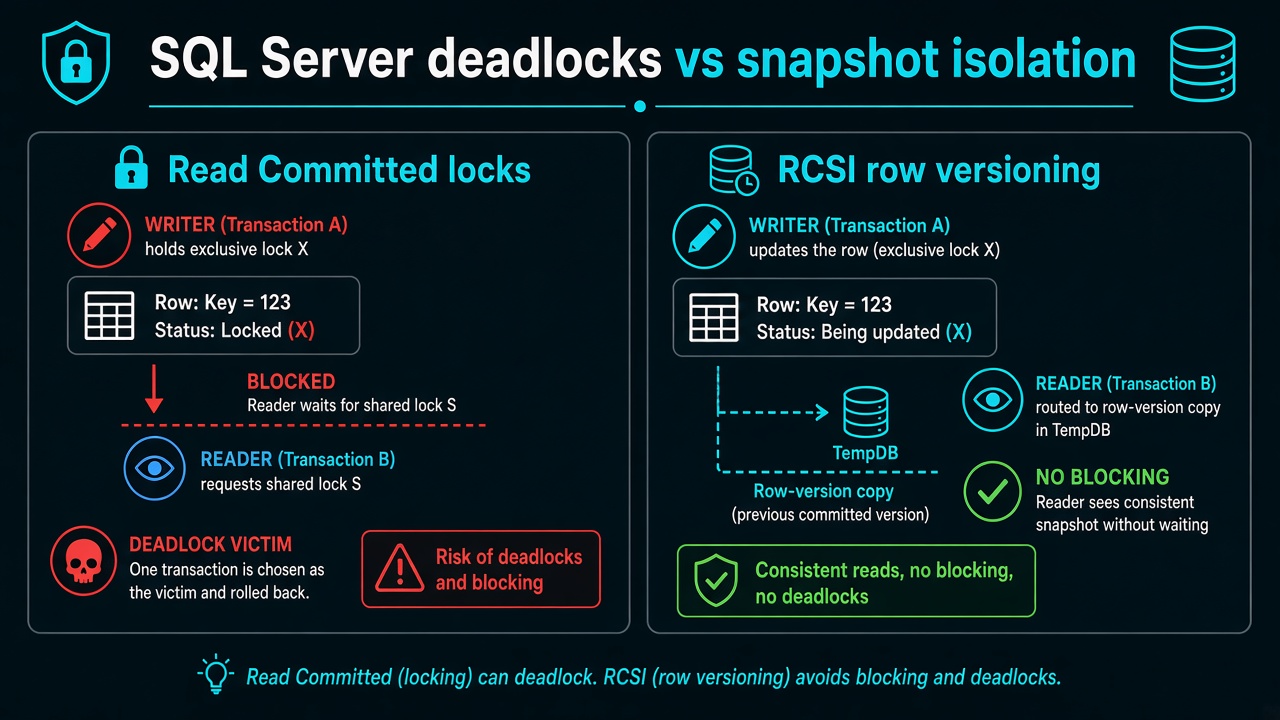
Read Committed Snapshot Isolation (RCSI) lets SQL Server readers see the last committed row version in TempDB instead of taking shared locks that block writers. It fixes many reader/writer deadlocks on ASP.NET Core APIs — it does not replace optimistic concurrency tokens when two writers touch the same row.
Read Committed (default)          RCSI enabled

Reader wants S lock  ──X──  Writer UPDATE    Reader reads version in TempDB
Writer waits on reader           Writer does not wait on readers
→ deadlock victim                → fewer reader/writer deadlocks
New to this → stay here. Merging a PR → Enable RCSI. On-call / interview → if an interviewer asks.
Terms used here: RCSI = READ_COMMITTED_SNAPSHOT ON at database level. Version store = row versions in TempDB. RowVersion = EF optimistic concurrency token for same-row writes.
The marketplace API threw SqlException: transaction was deadlocked and chosen as the victim. The deadlock graph was a long reporting SELECT holding shared locks against a checkout UPDATE. CPU looked fine. Throughput was not.
Default Read Committed takes shared locks on reads and exclusive locks on writes. They do not mix. Under load, a dashboard scan and an order write deadlock. Read Committed Snapshot Isolation (RCSI) makes readers see the last committed version instead of waiting on the writer.
This page is that switch. Two Angular tabs overwriting one encounter is optimistic concurrency. Extra SQL round-trips are N+1. TempDB latch waits after you enable RCSI are TempDB contention.
What was blocking
Writer holds X on the order row. Reader wants S. Incompatible. Reverse it: a fat SELECT holds S across many pages, checkout wants X. One of them dies. EF surfaces it as a failed SaveChanges or a timed-out query. Retrying the same isolation level just rolls the dice again.
I confirm with the deadlock XML (extended events or system_health). If both sessions are writers on the same key, RCSI will not save you — use a rowversion. If one is a read, RCSI is the first lever.
Enable RCSI
ALTER DATABASE [YourDatabaseName] SET READ_COMMITTED_SNAPSHOT ON;
That statement waits for connections to drain on some versions; I run it in a maintenance window on on-prem. Azure SQL Database already uses RCSI by default. If you are on Azure and still deadlock on reader/writer, look at the graph again before you “enable snapshot” a second time.
After RCSI, a reader during an UPDATE is sent to the version store in TempDB. Writers do not wait for readers. Reader/writer deadlocks of that shape drop.
Snapshot isolation as a session setting (SET TRANSACTION ISOLATION LEVEL SNAPSHOT) is a different, stricter versioning mode. I do not turn that on for every EF context. RCSI changes the database default for Read Committed, which is what EF uses unless you opted into something else.
Tradeoff: TempDB
Versions live in TempDB. Write-heavy fee imports plus RCSI plus one TempDB file on slow storage is how you swap deadlocks for allocation contention. Size TempDB, use multiple equal files, put it on fast disks. Azure hides some of this; a VM does not.
I do not enable RCSI on a misconfigured box as a Friday hero fix without watching PAGELATCH_UP on database id 2.
How to read the deadlock graph
SQL Server's system_health extended event session captures deadlock XMLs. In SSMS you can open the .xdl file from the ring buffer and see both sessions, the resources they held, and which was chosen as the victim.
Look at the waitresource on each edge. If one is RID or KEY on a data page and the other is an S lock on the same resource, RCSI likely fixes it. If both are X locks on the same key, you have a writer/writer conflict and RCSI will not help — add a RowVersion column and handle DbUpdateConcurrencyException in the application.
Deadlocks that show OBJECT locks (table-level) from a missing index are a different problem: the scan locks many pages and creates broad conflict. Fix the index before adding snapshot isolation.
If an interviewer asks
"How do you diagnose and fix reader/writer deadlocks in SQL Server?"
Read the deadlock graph from system_health. If one session holds a shared lock and the other needs an exclusive lock on the same resource, enable RCSI — readers use row versions in TempDB and no longer block writers. If both sessions are writers on the same row, the fix is an optimistic concurrency token (RowVersion) and retry logic in the application. RCSI does not fix last-write-wins.
30-second answer: PAGELATCH_UP → TempDB contention. Deadlock victim in system_health with one reader and one writer → enable RCSI. Two writers on the same row → add a RowVersion token.
Strong answer: Distinguishes RCSI (database-level, changes the default isolation for all Read Committed connections) from session-level SNAPSHOT isolation (explicit SET TRANSACTION ISOLATION LEVEL SNAPSHOT, stricter versioning). Names the TempDB version store trade-off — RCSI increases version store pressure on write-heavy workloads, so misconfigured TempDB can swap deadlocks for PAGELATCH_UP contention. Also confirms Azure SQL has RCSI on by default, so enabling it on-prem is the meaningful action.