TempDB contention means SQL Server threads queue on PAGELATCH_UP / PAGELATCH_EX while allocating pages in database id 2 (TempDB). The API hangs while SQL CPU looks idle — this is a file layout problem, not a missing EF index.
TempDB is a single shared database for every session on the SQL instance. When many concurrent threads need to allocate pages at the same time, they all queue on the same PFS (Page Free Space) or SGAM (Shared Global Allocation Map) bitmap pages. The more concurrent requests, the longer the queue. The symptom in an ASP.NET Core API is high latency with low CPU on the SQL server — the opposite of what you see with a bad query plan or an N+1.
One TempDB data file              Eight equal data files

[W1][W2][W3] → same PFS page     allocations round-robin
queue at latch                    latch waits drop
New to this → stay here. Merging a PR → fix multiple files. On-call / interview → if an interviewer asks.
Terms used here: PFS/SGAM = allocation bitmap pages in TempDB. RCSI = row versions also stored in TempDB. Spill = sort/hash workspace when memory is insufficient.
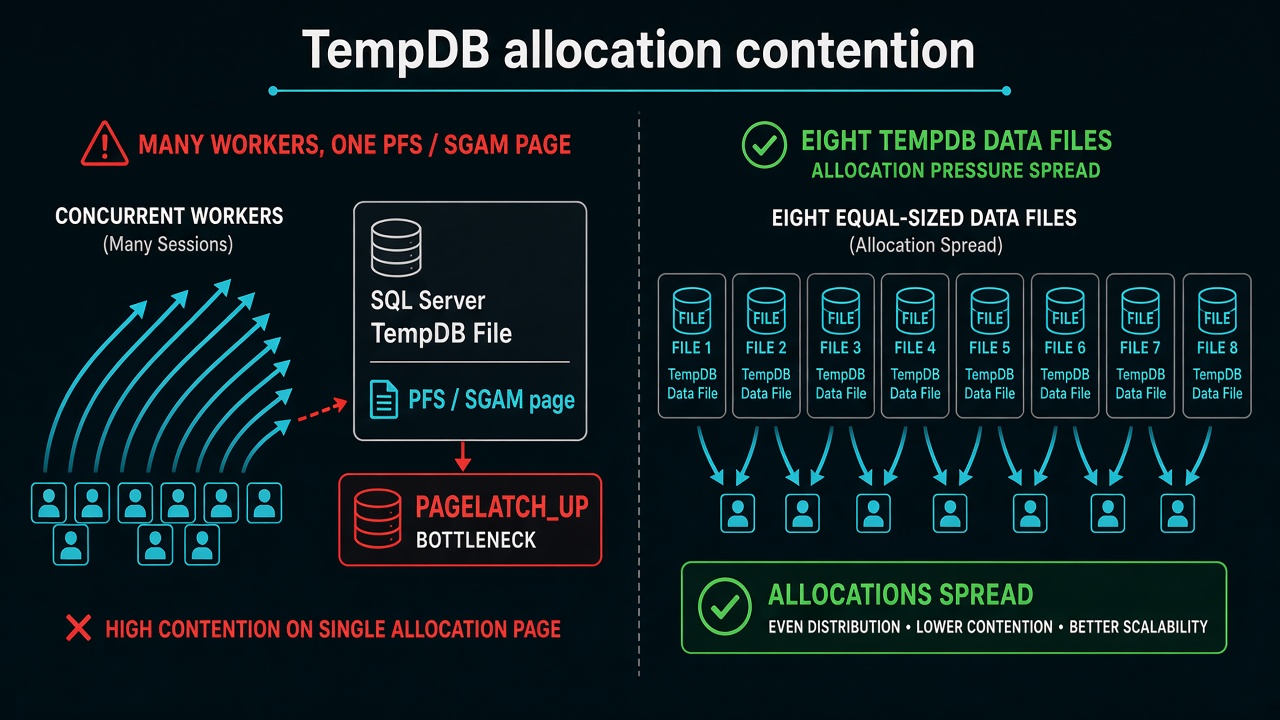
The API spiked to seconds of latency. CPU on SQL Server was quiet. Memory was fine. Wait stats showed PAGELATCH_UP on database id 2. That id is always TempDB. Threads were queuing to update the same PFS/SGAM allocation page.
This is not parameter sniffing (wrong plan, high CPU or reads). It is not a missing index you fix in EF. It is a file layout problem that a busy ASP.NET Core app will trigger with sorts, spills, and RCSI versioning.
Why a .NET API hits this without #temp
EF does not have to write CREATE TABLE #t. SQL Server uses TempDB for:
- Sorts and hash joins when the plan cannot use an index (the performance unbounded
OrderByon a hub clinic) - Row versions after you enable RCSI to stop deadlocks
- Table variables and some spills from TVPs
Thousands of concurrent clinic requests allocate at once. One TempDB data file means one set of PFS/SGAM pages. Latch waits, API hangs, Angular timeouts.
Fix: multiple equal files
Split TempDB so allocations round-robin:
- Count: one file per logical CPU, stop at eight, add more only if latch waits remain.
- Size: every file the same size and the same autogrowth. A larger file becomes the new hotspot.
- Growth: fixed MB, not 10%. Tiny growth under load is another latch storm.
- Old instances: SQL Server 2016+ already behaves like trace flags 1117/1118. Do not chase those flags on 2019+ as the first step.
I do this on the VM or in the SQL configuration, not in OnModelCreating. Azure SQL and some managed offerings hide TempDB; if you cannot add files, you reduce spills (indexes, tighter date windows) and watch whether RCSI is worth the version-store traffic.
How to confirm it is TempDB contention
Check wait stats before touching file layout:
SELECT wait_type, waiting_tasks_count, wait_time_ms
FROM sys.dm_os_wait_stats
WHERE wait_type IN ('PAGELATCH_UP', 'PAGELATCH_EX', 'PAGEIOLATCH_SH')
ORDER BY wait_time_ms DESC;
Then check which database owns those latches:
SELECT session_id, wait_type, resource_description
FROM sys.dm_exec_requests
WHERE wait_type LIKE 'PAGELATCH%';
resource_description contains the database id. Database id 2 is always TempDB. If you see another database id, you have a different problem — an unindexed hot page or a very wide row under heavy writes.
Do not look at PAGEIOLATCH_SH first. That points to disk I/O, not allocation contention. The two look similar in impact but have different fixes.
What I measure after
PAGELATCH_UPwait counts on TempDB should drop immediately after adding equal files and bouncing the service- Version store size if RCSI is on — a fee import that versions every row will still pressure TempDB even with eight files if the disk is slow
- I do not “fix TempDB” by adding
AsNoTrackingin C#.AsNoTrackingremoves change tracker overhead; it does not create extra TempDB files
If an interviewer asks
”The API has high latency but SQL CPU is low. How do you diagnose it?”
Check sys.dm_os_wait_stats for PAGELATCH_UP or PAGELATCH_EX. If resource_description shows database id 2, it is TempDB allocation contention. The fix is multiple equal-sized TempDB data files — not a missing index or a query rewrite.
30-second answer: PAGELATCH_UP on database id 2 is TempDB allocation contention — add multiple equal-sized TempDB data files (one per logical CPU, stop at eight). EF can trigger it via sorts, spills, and RCSI versions without explicit #temp tables.
Strong answer: Distinguishes from parameter sniffing (high CPU/reads, wrong plan) and reader/writer deadlocks (two sessions blocking each other). Mentions equal file size and autogrowth as critical — an oversized file recreates the hotspot. Warns that RCSI increases version-store pressure in TempDB, so adding TempDB files and enabling RCSI together requires watching both allocation waits and version store size.