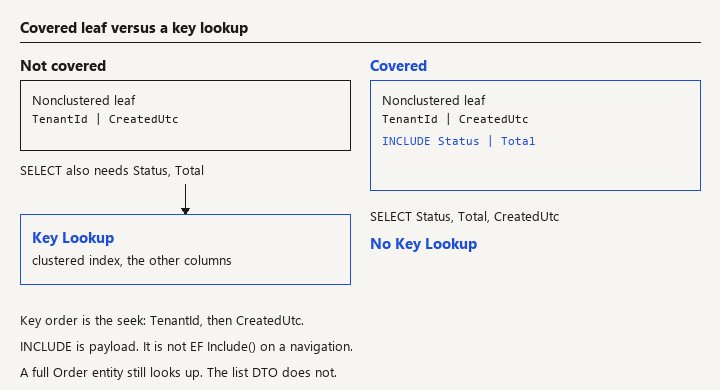
A covering index for an EF Core query is a SQL Server nonclustered index that holds every column that query reads. The optimizer can satisfy the query from the index leaf and skip the key lookup into the clustered index (or heap). EF Core will use that index only when the SQL it generates actually fits it.
LINQ Where + OrderBy + Select
    v
SQL  SELECT Status, Total, CreatedUtc
     WHERE TenantId = @t AND CreatedUtc >= @from
     ORDER BY CreatedUtc DESC
    v
Index (TenantId, CreatedUtc) INCLUDE (Status, Total)
    |
    +-- seek on the key, payload from INCLUDE
    +-- no key lookup
The index is a copy of a few columns, sorted for one access path. It is not a hint you attach in LINQ, and it is not .Include() on a navigation.
Query shape and split queries -> Include versus AsSplitQuery. Large reads -> download streaming. When the database is the ceiling -> capacity planning.
Search intent for covering index ef core is a how-to: choose key columns versus included columns, map them with the SQL Server provider, and prove the plan no longer key-looks-up.
Choose a key column or an INCLUDE column
SQL Server nonclustered indexes have two lists.
Key columns define the order of the index. Predicates and ORDER BY that match the leftmost prefix can seek. The key has hard limits (32 key columns, and a maximum key size of 1,700 bytes on current SQL Server versions; older versions were tighter). Wide keys make every insert update a fatter structure.
INCLUDE columns (non-key columns) sit at the leaf. They are not used to seek or sort. They exist so the leaf row already has the values your SELECT needs. The engine does not count them toward the key-column count or the key-size limit the way key columns count. They still cost space and they still get updated when the column changes.
Microsoft's guidance, which matches what you want with EF, is: key the columns you search and sort by; INCLUDE the columns you only project. A query is covered when every column it touches is in one of those two lists (and the predicate is otherwise sargable).
varchar(max), nvarchar(max), and similar LOB types do not belong in a key. They can be included on modern SQL Server and still make a covering index enormous. If a list endpoint "needs" a max column, the list endpoint is fetching too much. Project a summary. Do not INCLUDE a note body so a grid of 50 rows drags 50 documents into the leaf.
Project only the columns the index can cover
Watch: Include() does not add INCLUDE columns. Selecting the whole entity cannot be covered by the index you just added.
Start from the LINQ you actually ship, not from a dream SQL string. A typical tenant list:
public async Task<IReadOnlyList<OrderListItem>> ListAsync(
    Guid tenantId, DateTime createdFrom, int take, CancellationToken ct)
{
    return await _db.Orders.AsNoTracking()
        .Where(o => o.TenantId == tenantId && o.CreatedUtc >= createdFrom)
        .OrderByDescending(o => o.CreatedUtc)
        .Select(o => new OrderListItem(o.Status, o.Total, o.CreatedUtc))
        .Take(take)
        .ToListAsync(ct);
}

public readonly record struct OrderListItem(OrderStatus Status, decimal Total, DateTime CreatedUtc);
AsNoTracking keeps this off the change tracker. Select into a small type is what makes covering possible. If you materialize a full Order with twenty columns, the index must include twenty columns or the optimizer will go back to the clustered index for the rest, and it may reasonably ignore your nonclustered index.
Call ToQueryString() in a test and read the select list. That is the column list the index has to cover. EF will also select columns you did not mention when you load a full entity, when a concurrency token exists, or when you project an owned type that pulls extra fields. The SQL is the contract, not the LINQ shape you remember.
Sargability still applies. WHERE EF.Functions.Like(o.Code, "%" + suffix) and WHERE o.CreatedUtc.Date == day will not seek the index you just designed, covered or not. Fix the predicate before you add INCLUDE columns to it.
.Include(o => o.Lines) is a different feature. It joins or splits a related query. A covering index on Orders does not cover the lines query. Name them differently in reviews so "we included it" has one meaning.
Declare IncludeProperties in the EF model
Watch: An index created by hand in production and missing from the migration will not exist in the next environment. A filtered index the LINQ never matches looks like SQL Server ignored you.
IncludeProperties is a SQL Server provider extension. It is not on the relational base API. The using you want is Microsoft.EntityFrameworkCore (the extension ships with the SQL Server package).
modelBuilder.Entity<Order>()
    .HasIndex(o => new { o.TenantId, o.CreatedUtc })
    .IncludeProperties(o => new { o.Status, o.Total })
    .HasDatabaseName("IX_Orders_Tenant_Created");
Key order is the access path. TenantId then CreatedUtc serves "this tenant, ordered by time, optionally filtered by time." CreatedUtc then TenantId does not serve a predicate on TenantId alone. Leftmost prefix is the rule. If a second screen filters only by CreatedUtc across tenants, it needs a different index, not a hopeful reorder of this one.
The migration should emit SQL in this shape (names follow your conventions):
CREATE INDEX [IX_Orders_Tenant_Created]
ON [Orders] ([TenantId], [CreatedUtc])
INCLUDE ([Status], [Total]);
Read the migration. If IncludeProperties was ignored, the query will still compile and the lookup will remain. A common reason is configuring the index through a code path that drops provider-specific metadata, or hand-editing the migration and keeping only the key columns.
Filtered indexes are allowed when the LINQ is equally filtered and you are willing to match the filter exactly:
modelBuilder.Entity<Order>()
    .HasIndex(o => new { o.TenantId, o.CreatedUtc })
    .HasFilter("[Status] = 'Open'")
    .IncludeProperties(o => new { o.Total });
EF will not automatically add Status = 'Open' to every query. If the SQL does not contain a predicate SQL Server can prove matches the filter, the filtered index cannot be used. Prefer a plain covering index until you have a measured reason to filter.
Column order in the INCLUDE list does not change seek behavior. Keep it stable so migrations do not churn.
Prove the key lookup is gone
Watch: A plan from a tiny database hides the key lookup. Check a plan where the lookup is expensive, and do not INCLUDE an nvarchar(max) column.
An index in sys.indexes is not evidence the query uses it. Capture the plan for the SQL from ToQueryString(), with parameters realistic enough that the optimizer does not pick a scan for a "too small" stats estimate.
What you want on a point/range seek that is covered:
- An Index Seek (or an ordered scan of a narrow range) on
IX_Orders_Tenant_Created. - No Key Lookup operator feeding the rest of the columns.
- A narrower logical-read count than the clustered plan, measured with
SET STATISTICS IO ONfor that statement, on a table large enough that the difference exists.
If the plan still shows a key lookup, the select list contains a column you did not include. Diff the output list against the index definition. Add the column to INCLUDE only if the product truly returns it. Dropping it from the DTO is usually the better fix.
If the plan scans the clustered index anyway, the predicate is not sargable, the leftmost key does not match, statistics are stale, or the table is so small the optimizer prefers the scan. UPDATE STATISTICS after a bulk load before you conclude the index is useless. Do not slap WITH (INDEX(...)) into a raw SQL string to win the argument. Hints rot.
EF does not cache the plan you saw in SSMS. SQL Server does. After you change the index, queries pick it up as plans recompile. If you are comparing apples, compare the same parameter values. A tenantId that matches 90% of the table should scan. That is the optimizer being right, not the index being wrong. Covering indexes help the selective case your list screen actually runs.
Write a regression test that asserts the migration or the model contains the include list:
var index = context.Model.FindEntityType(typeof(Order))!
    .GetIndexes()
    .Single(i => i.GetDatabaseName() == "IX_Orders_Tenant_Created");

Assert.Equal(new[] { "Status", "Total" }, index.GetIncludeProperties());
GetIncludeProperties() is the model check. It does not prove the production database was migrated. A deployment check still has to confirm the index exists in the target environment. The test stops a refactor from deleting IncludeProperties while leaving HasIndex behind, which is an easy review miss because both look like "the index is there."
Accept the write cost, or do not add the index
Every insert and every update of Status or Total maintains this index. A table with a dozen covering indexes for a dozen screens will slow writes and bloat storage, and the optimizer will have more choices to get wrong. Add a covering index when a measured plan shows a lookup or a fat scan on a hot path, not when a grid might someday display another column.
Batch imports and the streaming export in file download streaming should project the same narrow shape. An export that selects * cannot be covered and should not drive you to INCLUDE every column "so the export is fast." Paginate the export by key and accept a clustered scan if it reads most of the table. Covering indexes win when they stay narrow.
Watch index maintenance after the index ships. Fragmentation on a monotonically increasing CreatedUtc key is usually ordinary page splits at the end, not an emergency. A key that is a random uniqueidentifier insert pattern splits pages everywhere. That is an argument about the key design, not a reason to rebuild nightly by reflex.
What makes SQL Server ignore the new index?
Include()called to "cover" a query. You loaded navigations. You did not add INCLUDE columns. You may also have created an N+1 or a cartesian result. Different article.- Indexing the key only and selecting extra columns. SQL Server finds the row in the nonclustered index and then key-looks-up for
StatusandTotal. At a few rows that is invisible. At page size 50, repeated, it is the query. SELECT *via a full entity "because the screen might need more later." The index cannot cover what you would not list.- Leading wildcard searches and functions on the column expected to seek the new index.
- INCLUDE of
nvarchar(max)so the leaf holds the worst column on the table. - A filtered index the LINQ never matches, then a conclusion that "SQL Server ignores our indexes."
- Trusting a plan from a 200-row dev database. The lookup shows up, and matters, when the statistics say the lookup is expensive.
- Creating the index in production by hand and not in the migration. The next environment does not have it, and the model test would have failed if the model had been the source.
How do you verify the list query is covered?
ToQueryString()on the list query selects onlyStatus,Total, andCreatedUtc, plus whateverTenantIdthe predicate needs. No extra columns you forgot on the entity.- The migration SQL contains
INCLUDE ([Status], [Total])on an index keyed by(TenantId, CreatedUtc)in that order. - The actual execution plan on a realistically sized table seeks that index and does not contain a Key Lookup for this statement.
- Logical reads dropped versus the previous plan, on that same data. Keep the two
STATISTICS IOoutputs with the commit. - An insert and an update of
Totalstill succeed and show up in the nonclustered index (a quickSELECTwith an index hint in a lower environment is enough to see maintenance). Do not leave the hint in application code. - The model unit test asserts
GetIncludeProperties(). - A second query that loads the full
Orderis allowed to look up or scan. You did not "fix" it by including every column.
When the plan is a seek with no lookup and the DTO is still small, stop. The next column on the screen is a product change that should pay for its own INCLUDE.